<?xml version="1.0" encoding="utf-8" standalone="yes"?><?xml-stylesheet type="text/xsl" href="/atom.xsl"?><feed xmlns="http://www.w3.org/2005/Atom" xml:lang="zh-cn"><id>https://maxlen727.github.io/tags/linux/</id><title>Linux on 暮歌</title><updated>2026-10-19T05:35:03Z</updated><language>zh-cn</language><subtitle>自留地，不是技术 blog, 仅仅用作我生活的记录</subtitle><background>/background_hu_d92feabfcd60f52c.webp</background><accent>139, 92, 246</accent><accentLight>167, 139, 250</accentLight><debounce>70</debounce><author><name>微恙</name><email>maxlen@duck.com</email><uri>https://maxlen727.github.io/</uri></author><link href="https://maxlen727.github.io/tags/linux/atom.xml" rel="self" type="application/atom+xml"/><link href="https://maxlen727.github.io/tags/linux/" rel="alternate" type="text/html"/><generator uri="https://gohugo.io" version="0.148.2">Hugo</generator><rights>© 2021 - 2026 MaxLen All Rights Reserved.</rights><entry><id>https://maxlen727.github.io/posts/9955hx-linux-suspend-acp-fix/</id><title>与 AMD Ryzen 9955HX Linux 挂起恢复后音频丢失问题的斗智斗勇</title><published>2026-08-30T16:29:27+08:00</published><updated>2026-08-30T16:29:27+08:00</updated><author><name>微恙</name></author><link href="https://maxlen727.github.io/posts/9955hx-linux-suspend-acp-fix/" rel="alternate" type="text/html"/><summary>我从来没想到过新硬件与 Linux 的配合是多么灾难……</summary><content type="html" xml:base="https://maxlen727.github.io/posts/9955hx-linux-suspend-acp-fix/"><![CDATA[<p>这里是正在给自己梳毛的束束，头发好久没有理了，真的有些乱了&hellip;</p>
<hr>
<p>这个假期里咱如愿以偿地获得了一台新笔记本，到手之后就被我安装上了 Arch Linux. 那时候的内核版本是 <code>7.0.13</code>. 当时使用的时候一切都近乎完美，体验十分平滑，没有遇到任何跟挂起恢复相关的问题。</p>
<p>后来随着系统滚动，内核来到了 <code>7.1.3</code> 这个版本，在这里遇到了奇怪的挂起恢复问题，表现为：挂起恢复后系统的整个音频堆栈似乎坏掉了，既看不见任何输出/输入设备，浏览器/mpv 在播放音视频时会直接卡死在第一帧。</p>
<p>束束遇到这个问题感到十分郁闷，由于硬件比较新，内核也比较新，导致在网上没有查到很多有效的信息。</p>
<p>但是现在毕竟是 AI 时代，本来对软件调试不太了解的束束也可以在协助下完成一些简单的查错。于是在 Cluade 的帮助下，<del>咱很轻松地发现了问题所在！</del> 其实是什么也没有收获。这个问题被 AI 工具们归因为 HDA 的一次内核回归。作为一个普通 Linux 用户，束束不希望自己去折腾内核的东西，想要真正解决就只好等上游了。</p>
<p>通过对 git commit 记录的定位，Claude 发现在 <code>7.0.13</code> 到 <code>7.1.3</code> 之间，Linux 内核的 HDA 部分发生了一些重构，可能就是这些改动导致了挂起恢复后音频丢失的问题。</p>
<p>那么第一反应就是想办法 workaround:</p>
<ol>
<li>重启 WirePlumber、PipeWire、PipeWire-Pulse 这套用户态服务</li>
<li>不行，那就把内核里的 <code>snd_hda_intel</code> 模块整个卸载重载一遍</li>
</ol>
<p>然而一切尝试的结果都是徒劳无功，最后的结果是束束依旧活在这个无声的世界里。</p>
<p>唉唉，实在是太悲伤了，由于能力有限，束束所能做的就这些了，只好先降级到<code>7.0.13</code>继续使用，并把 <code>linux</code> 包加入了 pacman 的排除列表里。</p>
<p>但是后来继续更新系统的过程中新问题继续出现：挂起恢复必定失败，屏幕只如一片死寂，虽然猫不应该怕黑，但束束就是觉得这比无声的世界还令人恐惧。通过控制变量逐个试验，发现原因是我只锁定了 <code>linux</code> 包的更新，但是接下来的问题出现在 <code>amd-ucode</code> 这个包上：</p>
<p>本来正常的环境是： <code>linux-7.0.13</code> + <code>amd-ucode-20260622-1</code> , 这是一套已经经过验证的稳定组合。</p>
<p>而局部升级之后的情况是 <code>linux-7.0.13</code> + <code>amd-ucode-20260810-1</code> , 在这个新的 AMD 微码版本中，为了迎合 <code>7.1</code> 内核的新变化，挂起恢复方面的行为发生了改变。但是我使用的旧内核并不与之相配。所以这个意料之外的包也需要锁定版本。</p>
<p>嗯&hellip;&hellip;果然对于滚动发行版来说局部升级是一种很危险的操作。</p>
<p>后来咱又尝试过几次全量更新，检查挂起恢复的音频问题是否解决，但似乎都没有取得什么进展——问题依旧。</p>
<p>好吧，束束承认自己在某些地方有点洁癖——比如一个一直有某个包卡着不能更新的滚动系统。这让某猫耳娘开始产生一些胡思乱想：难道我要和这个锁死的内核版本过一辈子吗呜呜，不要口牙！呜呜， <code>7.0.13</code> 吗？不是已经有很多已知的提权漏洞的版本吗！呜哇，好怕好怕！现在由于锁定了内核版本，导致用不上最新的 AMD 微码包，那万一之后有更多的包也需要锁定版本怎么办？我的 Arch-chan 不就变成了一个半新半旧的怪人了吗，心疼喵（</p>
<p><del>这些想法也实在是太怪异了吧！</del></p>
<p>以及在某次尝试全量更新的时候恰恰好还遇到了 <code>nvidia-open</code> 驱动的同样的回归 bug, 也是和挂起恢复相关的。具体表现为，挂起后无法正常恢复，还会导致机器温度狂飙，风扇啸叫。唉唉，咱确实有些倒霉了。于是 IgnorePKG 再喜添一群 NVIDIA 相关的包。</p>
<p>可恶&hellip;</p>
<p>实在是可恶哇！</p>
<p>好在最近两天去 NVIDIA 仓库的 issue 里盯的时候发现问题似乎修复了，于是束束再次尝试全量更新系统。</p>
<p>咚咚咚，arch-chan 滚动中&hellip;</p>
<p>这次更新过去一切似乎都正常了——至少挂起与恢复不再黑屏，只是又让束束进入到了无声世界里面罢了。而此次再寻，咱终于搜索到了一个关键的解决方案：</p>
<p><a
  href="https://patchew.org/linux/20260606204547.11945-1-david.glushkov%40sntiq.com/"
    target="_blank"
  >[PATCH] PCI: Disable async suspend for MSI Raider A18 HX A9WJG audio</a></p>
<p>补丁描述揭开了真正的谜底：AMD 的 ACP 和 Azalia/HDA 这两个功能，虽然在 PCI 总线上被暴露成两个独立的 function，却共享着同一套 ACPI 电源门控状态。</p>
<p>而内核默认允许设备异步恢复——也就是说，挂起恢复时，谁先醒谁后醒是不确定的。当这两个共享着底层电源门控资源的功能&quot;抢跑&quot;，顺序乱掉的那一刻，HDA 控制器就会卡在一个不上不下的半初始化状态里，去读 <code>CORBRP</code> 寄存器，读回来的永远是全 1——<code>0xffff</code>，也就是日志里那个看似普通、实则意味深长的 <code>65535</code>。</p>
<p>据小 C 告诉咱说：</p>
<blockquote>
<p>竞态条件最擅长的事，就是让所有基于&quot;日志现象反推&quot;的排查都无功而返，因为它压根不遵循任何一层软件栈自己的逻辑，它只服从谁先抢到总线这一件事。</p>
<p>这也顺带解释了那个曾经让我们百思不得其解的现象：为什么无论怎么重启 PipeWire、重载 <code>snd_hda_intel</code> 模块，声音都救不回来，唯独一次完整的冷重启能让一切恢复正常。因为坏掉的从来不是某个用户态缓存或者配置状态，而是 HDA 控制器这个物理 PCI 设备本身，在错误的恢复时序下，变成了一个真正意义上&quot;没有响应&quot;的僵尸。软件层面的任何补救，都够不到 PCI 枚举这个更早、更底层的阶段——只有重启，才能让一切从头再来一遍，赌一把这次的异步恢复顺序恰好没有踩雷。</p></blockquote>
<p>故事的结局也很普通：</p>
<pre tabindex="0"><code>pm_async=off
</code></pre><p>给内核加入这行启动参数之后，一切都恢复了正常。ACP 和 HDA 从此老老实实排队醒来，谁也不抢谁的电源门控状态。而关闭异步直觉上可能会让系统恢复变慢，但是对于现代平台来说，其实速度上的变化根本无所感知——就是足够快了。</p>
<p>以及以及！为什么上文在写到最后发现的解决办法时特意用词“搜索”呢？</p>
<p>因为那就是咱搜索出来的呀！这是意在表达，束束不再相信 AI 给出的解决方案，而是去寻找 kernel hackers 们是否提供有她们的经验。以后再遇到这种问题，束束一定要自己尝试搜索，而不是只依赖 AI.</p>
<p>AI First, Not AI Everything ✨</p>
<hr>
<p>尾巴~</p>
<p>这次虽然是倾向提供 workaround 的技术文章，但尝试了一些些故事化的写法，希望能让这篇文章既不失实用性，又能提供一点点趣味(≧▽≦)</p>
]]></content><category term="AMD"/><category term="Linux"/><category term="ACP"/><category term="挂起恢复"/><category term="笔记本"/></entry><entry><id>https://maxlen727.github.io/posts/linux-rvc-woys/</id><title>Linux 下如何使用 RVC 变声器</title><published>2026-08-04T17:54:31+08:00</published><updated>2026-08-04T17:54:31+08:00</updated><author><name>微恙</name></author><link href="https://maxlen727.github.io/posts/linux-rvc-woys/" rel="alternate" type="text/html"/><summary>发现了一个 Linux 下的 RVC 的 TUI, 极大方便了使用变声器，分享一下这个好玩的项目</summary><content type="html" xml:base="https://maxlen727.github.io/posts/linux-rvc-woys/"><![CDATA[<p>这里是正在喝茶的束束，水加多了，茶味淡了。好啦好啦，也许水加多的不止是茶，还有——</p>
<hr>
<div class="github-card-wrapper">
    <a id="github-e93ec9888b2a10c8f92f1e4e55d344a0" target="_blank" href="https://github.com/alirexha/woys" class="cursor-pointer">
      <div
        class="w-full md:w-auto p-0 m-0 border border-neutral-200 dark:border-neutral-700 border rounded-md shadow-2xl"><div class="w-full nozoom">
            <img
              src="https://opengraph.githubassets.com/0/alirexha/woys"
              alt="GitHub Repository Thumbnail"
              class="nozoom mt-0 mb-0 w-full h-full object-cover">
          </div><div class="w-full md:w-auto pt-3 p-5">
          <div class="flex items-center">
            <span class="text-2xl text-neutral-800 dark:text-neutral mr-[10px]">
              <span class="relative block icon"><svg xmlns="http://www.w3.org/2000/svg" viewBox="0 0 496 512"><path fill="currentColor" d="M165.9 397.4c0 2-2.3 3.6-5.2 3.6-3.3.3-5.6-1.3-5.6-3.6 0-2 2.3-3.6 5.2-3.6 3-.3 5.6 1.3 5.6 3.6zm-31.1-4.5c-.7 2 1.3 4.3 4.3 4.9 2.6 1 5.6 0 6.2-2s-1.3-4.3-4.3-5.2c-2.6-.7-5.5.3-6.2 2.3zm44.2-1.7c-2.9.7-4.9 2.6-4.6 4.9.3 2 2.9 3.3 5.9 2.6 2.9-.7 4.9-2.6 4.6-4.6-.3-1.9-3-3.2-5.9-2.9zM244.8 8C106.1 8 0 113.3 0 252c0 110.9 69.8 205.8 169.5 239.2 12.8 2.3 17.3-5.6 17.3-12.1 0-6.2-.3-40.4-.3-61.4 0 0-70 15-84.7-29.8 0 0-11.4-29.1-27.8-36.6 0 0-22.9-15.7 1.6-15.4 0 0 24.9 2 38.6 25.8 21.9 38.6 58.6 27.5 72.9 20.9 2.3-16 8.8-27.1 16-33.7-55.9-6.2-112.3-14.3-112.3-110.5 0-27.5 7.6-41.3 23.6-58.9-2.6-6.5-11.1-33.3 2.6-67.9 20.9-6.5 69 27 69 27 20-5.6 41.5-8.5 62.8-8.5s42.8 2.9 62.8 8.5c0 0 48.1-33.6 69-27 13.7 34.7 5.2 61.4 2.6 67.9 16 17.7 25.8 31.5 25.8 58.9 0 96.5-58.9 104.2-114.8 110.5 9.2 7.9 17 22.9 17 46.4 0 33.7-.3 75.4-.3 83.6 0 6.5 4.6 14.4 17.3 12.1C428.2 457.8 496 362.9 496 252 496 113.3 383.5 8 244.8 8zM97.2 352.9c-1.3 1-1 3.3.7 5.2 1.6 1.6 3.9 2.3 5.2 1 1.3-1 1-3.3-.7-5.2-1.6-1.6-3.9-2.3-5.2-1zm-10.8-8.1c-.7 1.3.3 2.9 2.3 3.9 1.6 1 3.6.7 4.3-.7.7-1.3-.3-2.9-2.3-3.9-2-.6-3.6-.3-4.3.7zm32.4 35.6c-1.6 1.3-1 4.3 1.3 6.2 2.3 2.3 5.2 2.6 6.5 1 1.3-1.3.7-4.3-1.3-6.2-2.2-2.3-5.2-2.6-6.5-1zm-11.4-14.7c-1.6 1-1.6 3.6 0 5.9 1.6 2.3 4.3 3.3 5.6 2.3 1.6-1.3 1.6-3.9 0-6.2-1.4-2.3-4-3.3-5.6-2z"/></svg>
</span>
            </span>
            <div
              id="github-e93ec9888b2a10c8f92f1e4e55d344a0-full_name"
              class="m-0 font-bold text-xl text-neutral-800 decoration-primary-500 hover:underline hover:underline-offset-2 dark:text-neutral">
              alirexha/woys
            </div>
          </div>

          <p id="github-e93ec9888b2a10c8f92f1e4e55d344a0-description" class="m-0 mt-2 text-md text-neutral-800 dark:text-neutral">
            Linux-native real-time voice changer. RVC-only on ONNX Runtime CUDA, PipeWire-native, TUI. Fork of w-okada/voice-changer.
          </p>

          <div class="m-0 mt-2 flex items-center">
            <span
              class="mr-1 inline-block h-3 w-3 rounded-full"
              style="background-color: #3572A5"></span>
            <div class="m-0 mr-5 text-md text-neutral-800 dark:text-neutral">
              Python
            </div>

            <span class="text-md mr-1 text-neutral-800 dark:text-neutral">
              <span class="relative block icon"><svg xmlns="http://www.w3.org/2000/svg" viewBox="0 0 576 512"><path fill="currentColor" d="M287.9 0C297.1 0 305.5 5.25 309.5 13.52L378.1 154.8L531.4 177.5C540.4 178.8 547.8 185.1 550.7 193.7C553.5 202.4 551.2 211.9 544.8 218.2L433.6 328.4L459.9 483.9C461.4 492.9 457.7 502.1 450.2 507.4C442.8 512.7 432.1 513.4 424.9 509.1L287.9 435.9L150.1 509.1C142.9 513.4 133.1 512.7 125.6 507.4C118.2 502.1 114.5 492.9 115.1 483.9L142.2 328.4L31.11 218.2C24.65 211.9 22.36 202.4 25.2 193.7C28.03 185.1 35.5 178.8 44.49 177.5L197.7 154.8L266.3 13.52C270.4 5.249 278.7 0 287.9 0L287.9 0zM287.9 78.95L235.4 187.2C231.9 194.3 225.1 199.3 217.3 200.5L98.98 217.9L184.9 303C190.4 308.5 192.9 316.4 191.6 324.1L171.4 443.7L276.6 387.5C283.7 383.7 292.2 383.7 299.2 387.5L404.4 443.7L384.2 324.1C382.9 316.4 385.5 308.5 391 303L476.9 217.9L358.6 200.5C350.7 199.3 343.9 194.3 340.5 187.2L287.9 78.95z"/></svg></span>
            </span>
            <div id="github-e93ec9888b2a10c8f92f1e4e55d344a0-stargazers" class="m-0 mr-5 text-md text-neutral-800 dark:text-neutral">
              5
            </div>

            <span class="text-md mr-1 text-neutral-800 dark:text-neutral">
              <span class="relative block icon"><svg xmlns="http://www.w3.org/2000/svg" viewBox="0 0 448 512"><path fill="currentColor" d="M80 104c13.3 0 24-10.7 24-24s-10.7-24-24-24S56 66.7 56 80s10.7 24 24 24zm80-24c0 32.8-19.7 61-48 73.3V192c0 17.7 14.3 32 32 32H304c17.7 0 32-14.3 32-32V153.3C307.7 141 288 112.8 288 80c0-44.2 35.8-80 80-80s80 35.8 80 80c0 32.8-19.7 61-48 73.3V192c0 53-43 96-96 96H256v70.7c28.3 12.3 48 40.5 48 73.3c0 44.2-35.8 80-80 80s-80-35.8-80-80c0-32.8 19.7-61 48-73.3V288H144c-53 0-96-43-96-96V153.3C19.7 141 0 112.8 0 80C0 35.8 35.8 0 80 0s80 35.8 80 80zm208 24c13.3 0 24-10.7 24-24s-10.7-24-24-24s-24 10.7-24 24s10.7 24 24 24zM248 432c0-13.3-10.7-24-24-24s-24 10.7-24 24s10.7 24 24 24s24-10.7 24-24z"/></svg></span>
            </span>
            <div id="github-e93ec9888b2a10c8f92f1e4e55d344a0-forks" class="m-0 mr-5 text-md text-neutral-800 dark:text-neutral">
              0
            </div>
          </div>
        </div>
      </div>


    </a>
  </div>
<p>其实使用方法在仓库的 README 里面已经写的很清楚了</p>
<p>本质 Voice Changer, 把多余的跨平台代码都剔除掉了，仅仅保留 Linux 部分，仅支持 RVC 模式，是个极其轻量的 TUI. 还可以 RNNoise 处理降噪。</p>
<p>硬件要求上，此项目仅支持 CUDA 推理，所以可能把 AMD 和 Intel 显卡的用户排除掉了（貌似听说过一些 CUDA 兼容层存在，但具体情况没有了解过）。并且没有 CPU 回退。</p>
<p>音频堆栈要求使用 PipeWire. （话说桌面 Linux 用户也没人用古老的 PulseAudio 了吧）</p>
<p>大致复述一下 README 里介绍的使用方法：</p>
<div class="highlight"><pre tabindex="0" class="chroma"><code class="language-bash" data-lang="bash"><span class="line"><span class="cl">git clone https://github.com/alirexha/woys.git
</span></span><span class="line"><span class="cl"><span class="nb">cd</span> woys
</span></span><span class="line"><span class="cl">./install.sh
</span></span></code></pre></div><p>真的就这么简单</p>
<p><del>又水一篇💦</del></p>
]]></content><category term="RVC"/><category term="变声器"/><category term="Woys"/><category term="Linux"/></entry><entry><id>https://maxlen727.github.io/posts/weekly-5/</id><title>「并非Weekly」5</title><published>2026-08-03T18:22:08+08:00</published><updated>2026-08-03T18:22:08+08:00</updated><author><name>微恙</name></author><link href="https://maxlen727.github.io/posts/weekly-5/" rel="alternate" type="text/html"/><summary>最近在开发一个 Galgame; 开始用 niri 了；解放于高考，囿困于自由；一个奇怪的作息改变；感叹 AI 之速</summary><content type="html" xml:base="https://maxlen727.github.io/posts/weekly-5/"><![CDATA[<p>诸位拾星者们好久不见，很久没有写 blog 了</p>
<hr>

<h2 class="relative group">最近在开发一个 Galgame 
    <div id="最近在开发一个-galgame" class="anchor"></div>
    
    <span
        class="absolute top-0 w-6 transition-opacity opacity-0 ltr:-left-6 rtl:-right-6 not-prose group-hover:opacity-100 select-none">
        <a class="group-hover:text-primary-300 dark:group-hover:text-neutral-700 !no-underline" href="#%e6%9c%80%e8%bf%91%e5%9c%a8%e5%bc%80%e5%8f%91%e4%b8%80%e4%b8%aa-galgame" aria-label="锚点">#</a>
    </span>        
    
</h2>
<div class="github-card-wrapper">
    <a id="github-7b2ba6a78580024d9b8b3014cf88955b" target="_blank" href="https://github.com/maxlen727/students-of-poetry-club" class="cursor-pointer">
      <div
        class="w-full md:w-auto p-0 m-0 border border-neutral-200 dark:border-neutral-700 border rounded-md shadow-2xl"><div class="w-full nozoom">
            <img
              src="https://opengraph.githubassets.com/0/maxlen727/students-of-poetry-club"
              alt="GitHub Repository Thumbnail"
              class="nozoom mt-0 mb-0 w-full h-full object-cover">
          </div><div class="w-full md:w-auto pt-3 p-5">
          <div class="flex items-center">
            <span class="text-2xl text-neutral-800 dark:text-neutral mr-[10px]">
              <span class="relative block icon"><svg xmlns="http://www.w3.org/2000/svg" viewBox="0 0 496 512"><path fill="currentColor" d="M165.9 397.4c0 2-2.3 3.6-5.2 3.6-3.3.3-5.6-1.3-5.6-3.6 0-2 2.3-3.6 5.2-3.6 3-.3 5.6 1.3 5.6 3.6zm-31.1-4.5c-.7 2 1.3 4.3 4.3 4.9 2.6 1 5.6 0 6.2-2s-1.3-4.3-4.3-5.2c-2.6-.7-5.5.3-6.2 2.3zm44.2-1.7c-2.9.7-4.9 2.6-4.6 4.9.3 2 2.9 3.3 5.9 2.6 2.9-.7 4.9-2.6 4.6-4.6-.3-1.9-3-3.2-5.9-2.9zM244.8 8C106.1 8 0 113.3 0 252c0 110.9 69.8 205.8 169.5 239.2 12.8 2.3 17.3-5.6 17.3-12.1 0-6.2-.3-40.4-.3-61.4 0 0-70 15-84.7-29.8 0 0-11.4-29.1-27.8-36.6 0 0-22.9-15.7 1.6-15.4 0 0 24.9 2 38.6 25.8 21.9 38.6 58.6 27.5 72.9 20.9 2.3-16 8.8-27.1 16-33.7-55.9-6.2-112.3-14.3-112.3-110.5 0-27.5 7.6-41.3 23.6-58.9-2.6-6.5-11.1-33.3 2.6-67.9 20.9-6.5 69 27 69 27 20-5.6 41.5-8.5 62.8-8.5s42.8 2.9 62.8 8.5c0 0 48.1-33.6 69-27 13.7 34.7 5.2 61.4 2.6 67.9 16 17.7 25.8 31.5 25.8 58.9 0 96.5-58.9 104.2-114.8 110.5 9.2 7.9 17 22.9 17 46.4 0 33.7-.3 75.4-.3 83.6 0 6.5 4.6 14.4 17.3 12.1C428.2 457.8 496 362.9 496 252 496 113.3 383.5 8 244.8 8zM97.2 352.9c-1.3 1-1 3.3.7 5.2 1.6 1.6 3.9 2.3 5.2 1 1.3-1 1-3.3-.7-5.2-1.6-1.6-3.9-2.3-5.2-1zm-10.8-8.1c-.7 1.3.3 2.9 2.3 3.9 1.6 1 3.6.7 4.3-.7.7-1.3-.3-2.9-2.3-3.9-2-.6-3.6-.3-4.3.7zm32.4 35.6c-1.6 1.3-1 4.3 1.3 6.2 2.3 2.3 5.2 2.6 6.5 1 1.3-1.3.7-4.3-1.3-6.2-2.2-2.3-5.2-2.6-6.5-1zm-11.4-14.7c-1.6 1-1.6 3.6 0 5.9 1.6 2.3 4.3 3.3 5.6 2.3 1.6-1.3 1.6-3.9 0-6.2-1.4-2.3-4-3.3-5.6-2z"/></svg>
</span>
            </span>
            <div
              id="github-7b2ba6a78580024d9b8b3014cf88955b-full_name"
              class="m-0 font-bold text-xl text-neutral-800 decoration-primary-500 hover:underline hover:underline-offset-2 dark:text-neutral">
              maxlen727/students-of-poetry-club
            </div>
          </div>

          <p id="github-7b2ba6a78580024d9b8b3014cf88955b-description" class="m-0 mt-2 text-md text-neutral-800 dark:text-neutral">
            🎮 想法产生了很久，终于准备把它做出来的一个视觉小说
          </p>

          <div class="m-0 mt-2 flex items-center">
            <span
              class="mr-1 inline-block h-3 w-3 rounded-full"
              style="background-color: #355570"></span>
            <div class="m-0 mr-5 text-md text-neutral-800 dark:text-neutral">
              GDScript
            </div>

            <span class="text-md mr-1 text-neutral-800 dark:text-neutral">
              <span class="relative block icon"><svg xmlns="http://www.w3.org/2000/svg" viewBox="0 0 576 512"><path fill="currentColor" d="M287.9 0C297.1 0 305.5 5.25 309.5 13.52L378.1 154.8L531.4 177.5C540.4 178.8 547.8 185.1 550.7 193.7C553.5 202.4 551.2 211.9 544.8 218.2L433.6 328.4L459.9 483.9C461.4 492.9 457.7 502.1 450.2 507.4C442.8 512.7 432.1 513.4 424.9 509.1L287.9 435.9L150.1 509.1C142.9 513.4 133.1 512.7 125.6 507.4C118.2 502.1 114.5 492.9 115.1 483.9L142.2 328.4L31.11 218.2C24.65 211.9 22.36 202.4 25.2 193.7C28.03 185.1 35.5 178.8 44.49 177.5L197.7 154.8L266.3 13.52C270.4 5.249 278.7 0 287.9 0L287.9 0zM287.9 78.95L235.4 187.2C231.9 194.3 225.1 199.3 217.3 200.5L98.98 217.9L184.9 303C190.4 308.5 192.9 316.4 191.6 324.1L171.4 443.7L276.6 387.5C283.7 383.7 292.2 383.7 299.2 387.5L404.4 443.7L384.2 324.1C382.9 316.4 385.5 308.5 391 303L476.9 217.9L358.6 200.5C350.7 199.3 343.9 194.3 340.5 187.2L287.9 78.95z"/></svg></span>
            </span>
            <div id="github-7b2ba6a78580024d9b8b3014cf88955b-stargazers" class="m-0 mr-5 text-md text-neutral-800 dark:text-neutral">
              5
            </div>

            <span class="text-md mr-1 text-neutral-800 dark:text-neutral">
              <span class="relative block icon"><svg xmlns="http://www.w3.org/2000/svg" viewBox="0 0 448 512"><path fill="currentColor" d="M80 104c13.3 0 24-10.7 24-24s-10.7-24-24-24S56 66.7 56 80s10.7 24 24 24zm80-24c0 32.8-19.7 61-48 73.3V192c0 17.7 14.3 32 32 32H304c17.7 0 32-14.3 32-32V153.3C307.7 141 288 112.8 288 80c0-44.2 35.8-80 80-80s80 35.8 80 80c0 32.8-19.7 61-48 73.3V192c0 53-43 96-96 96H256v70.7c28.3 12.3 48 40.5 48 73.3c0 44.2-35.8 80-80 80s-80-35.8-80-80c0-32.8 19.7-61 48-73.3V288H144c-53 0-96-43-96-96V153.3C19.7 141 0 112.8 0 80C0 35.8 35.8 0 80 0s80 35.8 80 80zm208 24c13.3 0 24-10.7 24-24s-10.7-24-24-24s-24 10.7-24 24s10.7 24 24 24zM248 432c0-13.3-10.7-24-24-24s-24 10.7-24 24s10.7 24 24 24s24-10.7 24-24z"/></svg></span>
            </span>
            <div id="github-7b2ba6a78580024d9b8b3014cf88955b-forks" class="m-0 mr-5 text-md text-neutral-800 dark:text-neutral">
              0
            </div>
          </div>
        </div>
      </div>


    </a>
  </div>
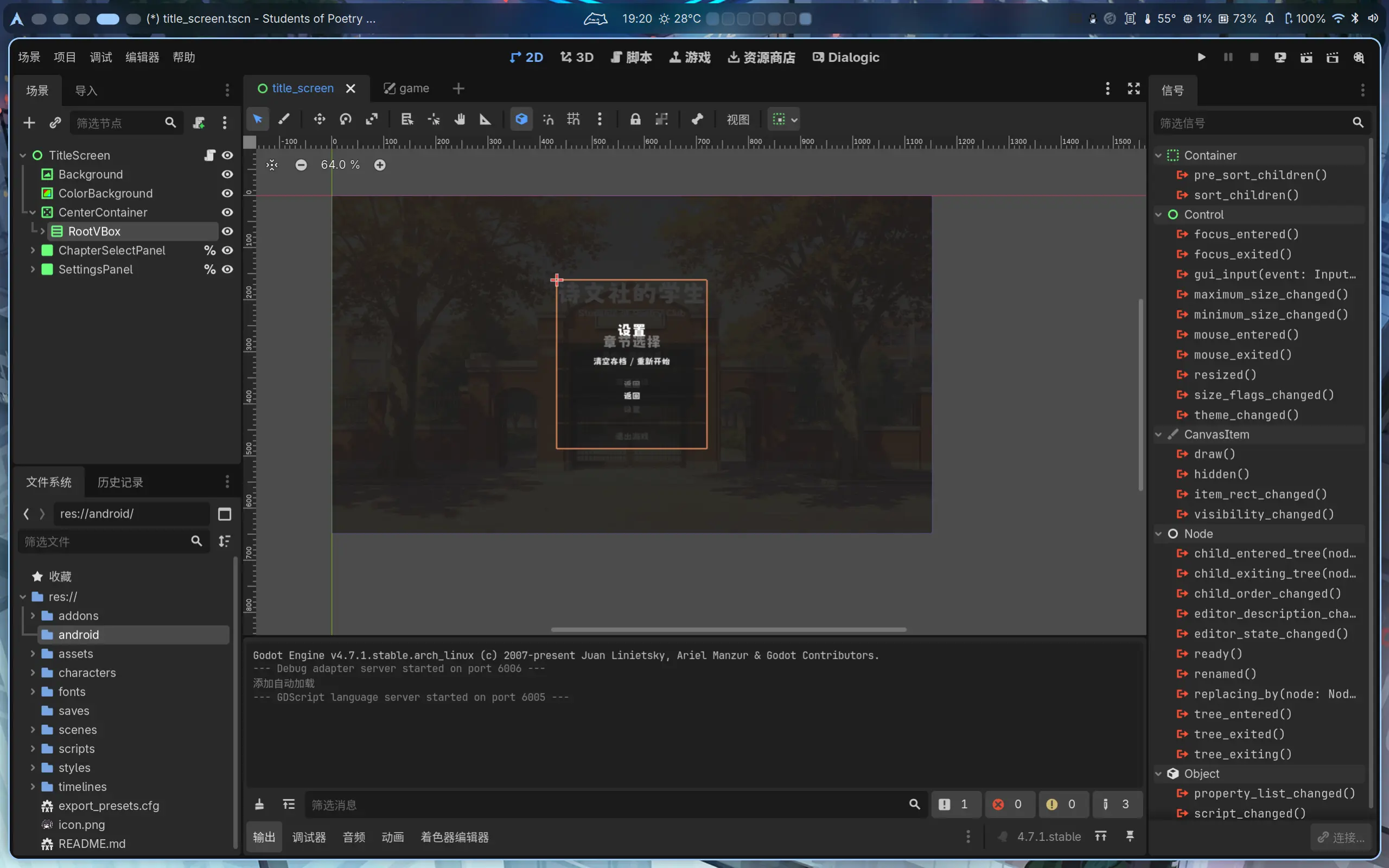
<p>这个项目是束束一直以来想做的。在束束还在上高中的时候，有位好朋友向我提到了“诗词娘” Galgame 的想法，苦于时间有限，承诺要帮忙一起做的东西一直没有交付，后来我们渐渐忘记了这件事，想法也搁置了。</p>
<p>现在步入一个很长的假期，束束希望可以完成我曾经的承诺，并悄悄给同学一个惊喜，然而开发过程并非一帆风顺，遇到了很多困难，目前项目甚至暂时陷入了停滞状态&hellip;&hellip;之后准备再写一些开发手记来详细谈谈遇到的问题</p>
<p>


<figure>
    <img class="my-0 rounded-md" loading="lazy" alt="Godot开发界面" src="https://maxlen727.github.io/picx-images-hosting/1785756026206751010.7lkphc7zn0.webp">

  
</figure>
</p>
<hr>

<h2 class="relative group">开始用 niri 了 
    <div id="开始用-niri-了" class="anchor"></div>
    
    <span
        class="absolute top-0 w-6 transition-opacity opacity-0 ltr:-left-6 rtl:-right-6 not-prose group-hover:opacity-100 select-none">
        <a class="group-hover:text-primary-300 dark:group-hover:text-neutral-700 !no-underline" href="#%e5%bc%80%e5%a7%8b%e7%94%a8-niri-%e4%ba%86" aria-label="锚点">#</a>
    </span>        
    
</h2>
<p>以前也用过窗口管理器 hyprland, 之后在某次更新中束束原来写的 hyprland 配置由于语法被破坏了，这才让束束明白到 hyprland 实在是一个非常激进的项目，它并不适合日用。并且当时的时间似乎是 2023 年末，那会 Wayland 还不像现在一样成熟。最后还是用回了 KDE</p>
<p>最近刷到了 <a
  href="https://www.bilibili.com/video/BV1CHZaBrEF6/"
    target="_blank"
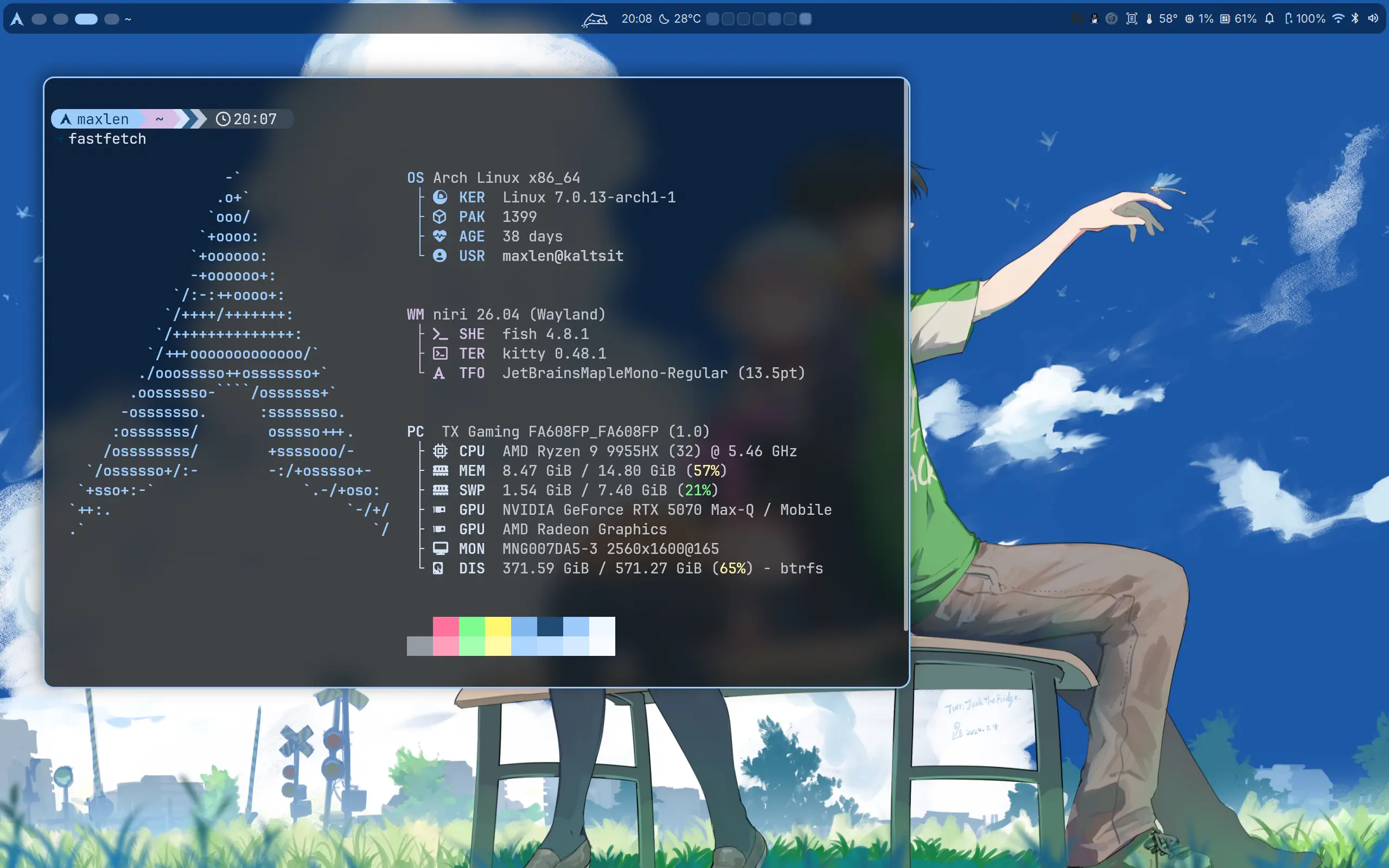
  >shorin 的 niri+DMS 的配置脚本</a>，发现了 DMS. 不得不感叹时代的进步，束束最后使用 hyprland 的那段时间其实已经步入“后自组装时代”&amp;“前 QiuckShell 时代”了，可那会束束没有去深研究。如今发现了 DankMaterialShell 这种东西出来，愈发觉得 wm 越来越逐渐变成一个完善的 de 了。</p>
<p>所以就是这样，我用上了 niri. 早期 niri 的前几个 preview 版本束束就已经在关注这个项目了，也实在没想到它这么快就成长为了和 hyprland 同级别的 wm.</p>
<p>


<figure>
    <img class="my-0 rounded-md" loading="lazy" alt="我现在的桌面" src="https://maxlen727.github.io/picx-images-hosting/image.232l18pyex.webp">

  
</figure>
</p>
<hr>

<h2 class="relative group">解放于高考，囿困于自由 
    <div id="解放于高考囿困于自由" class="anchor"></div>
    
    <span
        class="absolute top-0 w-6 transition-opacity opacity-0 ltr:-left-6 rtl:-right-6 not-prose group-hover:opacity-100 select-none">
        <a class="group-hover:text-primary-300 dark:group-hover:text-neutral-700 !no-underline" href="#%e8%a7%a3%e6%94%be%e4%ba%8e%e9%ab%98%e8%80%83%e5%9b%bf%e5%9b%b0%e4%ba%8e%e8%87%aa%e7%94%b1" aria-label="锚点">#</a>
    </span>        
    
</h2>
<p>束束的前面十几年人生都是被安排好的人生。</p>
<p>生活有父母帮我安排，到学校有课表的安排，老师的安排，回家又有作业的安排。真正自由可控的时间是少的——在这段自由的时间里我会去做一些自己喜欢的事，比如学习编程，折腾电脑。束束也曾幻想过等到自己没有课业所扰，可以畅游任意一个世界时能有多开心。</p>
<p>然而真正解放了，我丢失了什么。</p>
<p>是什么呢？束束不清楚这是什么原因。明明在没有时间的时候非常拥有折腾的热情——束束愿意把不多的假期全都投入到折腾电脑里，游戏也不打，屋门也不迈，时间会忘记，吃饭也不需要。现在呢？大把的时间，却躺在床上发呆，无心做一切。</p>
<p>这种拥有对束束来说太不真实，我竟然无法适应。</p>
<p>漫漫地度过了快两个月，我却没有做到过去畅想中的自己。时间无穷，耐心反而更被消磨：看视频我竟然无意识地倍速播放——这是一个令束束非常警惕的信号，通常束束会认为这是耐心不足——我很浮躁（尽管没有表现出来）</p>
<p>这也是束束写作的原因，写作是我整理生活的方式。只有这时候束束才能跟自己独处，和她说会话。</p>
<p>好累。</p>
<p>我又被自由困住了。</p>
<hr>

<h2 class="relative group">一个奇怪的作息改变 
    <div id="一个奇怪的作息改变" class="anchor"></div>
    
    <span
        class="absolute top-0 w-6 transition-opacity opacity-0 ltr:-left-6 rtl:-right-6 not-prose group-hover:opacity-100 select-none">
        <a class="group-hover:text-primary-300 dark:group-hover:text-neutral-700 !no-underline" href="#%e4%b8%80%e4%b8%aa%e5%a5%87%e6%80%aa%e7%9a%84%e4%bd%9c%e6%81%af%e6%94%b9%e5%8f%98" aria-label="锚点">#</a>
    </span>        
    
</h2>
<p>束束把作息调到了下午6点左右入睡，我会在凌晨3点或4点左右起床。显然这么做我睡的时间更长了，这对束束来说很舒服，并且似乎白天的精力也更充足。</p>
<p>以及最重要的——一个人，安静地，等待黎明。</p>
<hr>

<h2 class="relative group">感叹 AI 之速 
    <div id="感叹-ai-之速" class="anchor"></div>
    
    <span
        class="absolute top-0 w-6 transition-opacity opacity-0 ltr:-left-6 rtl:-right-6 not-prose group-hover:opacity-100 select-none">
        <a class="group-hover:text-primary-300 dark:group-hover:text-neutral-700 !no-underline" href="#%e6%84%9f%e5%8f%b9-ai-%e4%b9%8b%e9%80%9f" aria-label="锚点">#</a>
    </span>        
    
</h2>
<p>AI 进步神速。</p>
<p>以前束束跟进 AI 的模型进展，现在这反而是最不重要的一部分，对于 Agent 的实际使用反而才是现在 AI 时代重要的一部分。</p>
<p>曾经 AI 也就是日常对话，谁能想如今能够 Vibe Coding. 以前束束把 AI 的代码补全都当笑话看，现在又不得不佩服 AI 的代码能力之强大。以前 AI 实时音频对话都做不到，现在能够视频通话的模型遍地开花。以前的 Stable Diffusion 画图也就是能看的水平，如今的 AI 作图 SOTA 模型堪称惊艳。</p>
<p>这一切变化仅仅花了 1 年时间。1 年就可如此，不敢想之后的时代会变化成怎样。</p>
<p>束束自己也从此受益：Claude 帮我写了很多代码，解决了很多疑难。比如这个 DMS 的 Github Heatmap Plus 插件：</p>
<div class="github-card-wrapper">
    <a id="github-599a73ddce4014e0c19d9494eb70d800" target="_blank" href="https://github.com/maxlen727/DMS-GitHub_HeatMap_Plus" class="cursor-pointer">
      <div
        class="w-full md:w-auto p-0 m-0 border border-neutral-200 dark:border-neutral-700 border rounded-md shadow-2xl"><div class="w-full nozoom">
            <img
              src="https://opengraph.githubassets.com/0/maxlen727/DMS-GitHub_HeatMap_Plus"
              alt="GitHub Repository Thumbnail"
              class="nozoom mt-0 mb-0 w-full h-full object-cover">
          </div><div class="w-full md:w-auto pt-3 p-5">
          <div class="flex items-center">
            <span class="text-2xl text-neutral-800 dark:text-neutral mr-[10px]">
              <span class="relative block icon"><svg xmlns="http://www.w3.org/2000/svg" viewBox="0 0 496 512"><path fill="currentColor" d="M165.9 397.4c0 2-2.3 3.6-5.2 3.6-3.3.3-5.6-1.3-5.6-3.6 0-2 2.3-3.6 5.2-3.6 3-.3 5.6 1.3 5.6 3.6zm-31.1-4.5c-.7 2 1.3 4.3 4.3 4.9 2.6 1 5.6 0 6.2-2s-1.3-4.3-4.3-5.2c-2.6-.7-5.5.3-6.2 2.3zm44.2-1.7c-2.9.7-4.9 2.6-4.6 4.9.3 2 2.9 3.3 5.9 2.6 2.9-.7 4.9-2.6 4.6-4.6-.3-1.9-3-3.2-5.9-2.9zM244.8 8C106.1 8 0 113.3 0 252c0 110.9 69.8 205.8 169.5 239.2 12.8 2.3 17.3-5.6 17.3-12.1 0-6.2-.3-40.4-.3-61.4 0 0-70 15-84.7-29.8 0 0-11.4-29.1-27.8-36.6 0 0-22.9-15.7 1.6-15.4 0 0 24.9 2 38.6 25.8 21.9 38.6 58.6 27.5 72.9 20.9 2.3-16 8.8-27.1 16-33.7-55.9-6.2-112.3-14.3-112.3-110.5 0-27.5 7.6-41.3 23.6-58.9-2.6-6.5-11.1-33.3 2.6-67.9 20.9-6.5 69 27 69 27 20-5.6 41.5-8.5 62.8-8.5s42.8 2.9 62.8 8.5c0 0 48.1-33.6 69-27 13.7 34.7 5.2 61.4 2.6 67.9 16 17.7 25.8 31.5 25.8 58.9 0 96.5-58.9 104.2-114.8 110.5 9.2 7.9 17 22.9 17 46.4 0 33.7-.3 75.4-.3 83.6 0 6.5 4.6 14.4 17.3 12.1C428.2 457.8 496 362.9 496 252 496 113.3 383.5 8 244.8 8zM97.2 352.9c-1.3 1-1 3.3.7 5.2 1.6 1.6 3.9 2.3 5.2 1 1.3-1 1-3.3-.7-5.2-1.6-1.6-3.9-2.3-5.2-1zm-10.8-8.1c-.7 1.3.3 2.9 2.3 3.9 1.6 1 3.6.7 4.3-.7.7-1.3-.3-2.9-2.3-3.9-2-.6-3.6-.3-4.3.7zm32.4 35.6c-1.6 1.3-1 4.3 1.3 6.2 2.3 2.3 5.2 2.6 6.5 1 1.3-1.3.7-4.3-1.3-6.2-2.2-2.3-5.2-2.6-6.5-1zm-11.4-14.7c-1.6 1-1.6 3.6 0 5.9 1.6 2.3 4.3 3.3 5.6 2.3 1.6-1.3 1.6-3.9 0-6.2-1.4-2.3-4-3.3-5.6-2z"/></svg>
</span>
            </span>
            <div
              id="github-599a73ddce4014e0c19d9494eb70d800-full_name"
              class="m-0 font-bold text-xl text-neutral-800 decoration-primary-500 hover:underline hover:underline-offset-2 dark:text-neutral">
              maxlen727/DMS-GitHub_HeatMap_Plus
            </div>
          </div>

          <p id="github-599a73ddce4014e0c19d9494eb70d800-description" class="m-0 mt-2 text-md text-neutral-800 dark:text-neutral">
            🧩 GitHub contribution heatmap for DankBar and your desktop, with color-coded activity levels and theme-aware styling.
          </p>

          <div class="m-0 mt-2 flex items-center">
            <span
              class="mr-1 inline-block h-3 w-3 rounded-full"
              style="background-color: #44a51c"></span>
            <div class="m-0 mr-5 text-md text-neutral-800 dark:text-neutral">
              QML
            </div>

            <span class="text-md mr-1 text-neutral-800 dark:text-neutral">
              <span class="relative block icon"><svg xmlns="http://www.w3.org/2000/svg" viewBox="0 0 576 512"><path fill="currentColor" d="M287.9 0C297.1 0 305.5 5.25 309.5 13.52L378.1 154.8L531.4 177.5C540.4 178.8 547.8 185.1 550.7 193.7C553.5 202.4 551.2 211.9 544.8 218.2L433.6 328.4L459.9 483.9C461.4 492.9 457.7 502.1 450.2 507.4C442.8 512.7 432.1 513.4 424.9 509.1L287.9 435.9L150.1 509.1C142.9 513.4 133.1 512.7 125.6 507.4C118.2 502.1 114.5 492.9 115.1 483.9L142.2 328.4L31.11 218.2C24.65 211.9 22.36 202.4 25.2 193.7C28.03 185.1 35.5 178.8 44.49 177.5L197.7 154.8L266.3 13.52C270.4 5.249 278.7 0 287.9 0L287.9 0zM287.9 78.95L235.4 187.2C231.9 194.3 225.1 199.3 217.3 200.5L98.98 217.9L184.9 303C190.4 308.5 192.9 316.4 191.6 324.1L171.4 443.7L276.6 387.5C283.7 383.7 292.2 383.7 299.2 387.5L404.4 443.7L384.2 324.1C382.9 316.4 385.5 308.5 391 303L476.9 217.9L358.6 200.5C350.7 199.3 343.9 194.3 340.5 187.2L287.9 78.95z"/></svg></span>
            </span>
            <div id="github-599a73ddce4014e0c19d9494eb70d800-stargazers" class="m-0 mr-5 text-md text-neutral-800 dark:text-neutral">
              4
            </div>

            <span class="text-md mr-1 text-neutral-800 dark:text-neutral">
              <span class="relative block icon"><svg xmlns="http://www.w3.org/2000/svg" viewBox="0 0 448 512"><path fill="currentColor" d="M80 104c13.3 0 24-10.7 24-24s-10.7-24-24-24S56 66.7 56 80s10.7 24 24 24zm80-24c0 32.8-19.7 61-48 73.3V192c0 17.7 14.3 32 32 32H304c17.7 0 32-14.3 32-32V153.3C307.7 141 288 112.8 288 80c0-44.2 35.8-80 80-80s80 35.8 80 80c0 32.8-19.7 61-48 73.3V192c0 53-43 96-96 96H256v70.7c28.3 12.3 48 40.5 48 73.3c0 44.2-35.8 80-80 80s-80-35.8-80-80c0-32.8 19.7-61 48-73.3V288H144c-53 0-96-43-96-96V153.3C19.7 141 0 112.8 0 80C0 35.8 35.8 0 80 0s80 35.8 80 80zm208 24c13.3 0 24-10.7 24-24s-10.7-24-24-24s-24 10.7-24 24s10.7 24 24 24zM248 432c0-13.3-10.7-24-24-24s-24 10.7-24 24s10.7 24 24 24s24-10.7 24-24z"/></svg></span>
            </span>
            <div id="github-599a73ddce4014e0c19d9494eb70d800-forks" class="m-0 mr-5 text-md text-neutral-800 dark:text-neutral">
              0
            </div>
          </div>
        </div>
      </div>


    </a>
  </div>
<p>基本上都是 Claude 写的，效果非常好。</p>
<p>另外上文提到的游戏，Claude 也参与了极多，还有一些绘图模型参与。没有 AI 我真的无法一人进行这游戏的开发。</p>
<p>切切实实，我感受到了 AI 之速。太快了，她极快地进步，极快地改变时代。</p>
]]></content><category term="并非Weekly"/><category term="睡觉"/><category term="AI"/><category term="Galgame"/><category term="Linux"/><category term="Wayland"/><category term="Niri"/><category term="DMS"/><category term="高考"/></entry><entry><id>https://maxlen727.github.io/posts/pipewire-obs-virtual-mic/</id><title>用 PipeWire 和 OBS 实现 Linux 下虚拟麦克风</title><published>2025-03-22T06:30:43+08:00</published><updated>2025-03-22T06:30:43+08:00</updated><author><name>微恙</name></author><link href="https://maxlen727.github.io/posts/pipewire-obs-virtual-mic/" rel="alternate" type="text/html"/><summary>在视频录制或直播时，OBS 不仅能作为虚拟摄像头，还能通过一些设置将音频输出转换成虚拟麦克风，以此来享受 OBS 的降噪、增益、调音或别的插件效果</summary><content type="html" xml:base="https://maxlen727.github.io/posts/pipewire-obs-virtual-mic/"><![CDATA[<p>在视频录制或直播时，OBS 不仅能作为虚拟摄像头，还能通过一些设置将音频输出转换成虚拟麦克风，以此来享受 OBS 的降噪、增益、调音或别的插件效果。</p>
<hr>

<h2 class="relative group">1. 创建虚拟音频设备 
    <div id="1-创建虚拟音频设备" class="anchor"></div>
    
    <span
        class="absolute top-0 w-6 transition-opacity opacity-0 ltr:-left-6 rtl:-right-6 not-prose group-hover:opacity-100 select-none">
        <a class="group-hover:text-primary-300 dark:group-hover:text-neutral-700 !no-underline" href="#1-%e5%88%9b%e5%bb%ba%e8%99%9a%e6%8b%9f%e9%9f%b3%e9%a2%91%e8%ae%be%e5%a4%87" aria-label="锚点">#</a>
    </span>        
    
</h2>
<p>KDE 6下可以利用 PipeWire 来创建虚拟设备。首先，需要建立两个虚拟设备：</p>
<ul>
<li><strong>Virtual-Sink</strong>：作为 OBS 的虚拟音频输出设备。</li>
<li><strong>Virtual-Mic</strong>：作为虚拟麦克风输入设备，将 Virtual-Sink 的监控音频传输到其他应用程序。</li>
</ul>
<p>打开终端，输入以下命令：</p>
<div class="highlight"><pre tabindex="0" class="chroma"><code class="language-bash" data-lang="bash"><span class="line"><span class="cl">pactl load-module module-null-sink media.class<span class="o">=</span>Audio/Sink <span class="nv">sink_name</span><span class="o">=</span>Virtual-Sink
</span></span><span class="line"><span class="cl">pactl load-module module-null-sink media.class<span class="o">=</span>Audio/Source/Virtual <span class="nv">sink_name</span><span class="o">=</span>Virtual-Mic
</span></span></code></pre></div><p>这两条命令会分别创建名为 <code>Virtual-Sink</code> 和 <code>Virtual-Mic</code> 的虚拟音频设备。(&gt;ω&lt;)</p>
<hr>

<h2 class="relative group">2. 连接音频通道 
    <div id="2-连接音频通道" class="anchor"></div>
    
    <span
        class="absolute top-0 w-6 transition-opacity opacity-0 ltr:-left-6 rtl:-right-6 not-prose group-hover:opacity-100 select-none">
        <a class="group-hover:text-primary-300 dark:group-hover:text-neutral-700 !no-underline" href="#2-%e8%bf%9e%e6%8e%a5%e9%9f%b3%e9%a2%91%e9%80%9a%e9%81%93" aria-label="锚点">#</a>
    </span>        
    
</h2>
<p>下一步是将 OBS 的音频输出连接到 Virtual-Sink，再将 Virtual-Sink 的监控输出链接到 Virtual-Mic。具体操作如下：</p>
<ol>
<li>使用 <code>pw-link</code> 命令列出所有音频输出设备，找到 OBS 的音频输出设备（通常名称中会包含 <code>obs</code>）：</li>
</ol>
<div class="highlight"><pre tabindex="0" class="chroma"><code class="language-bash" data-lang="bash"><span class="line"><span class="cl">pw-link -o
</span></span></code></pre></div><ol start="2">
<li>将 OBS 的左右声道分别连接到 Virtual-Sink：</li>
</ol>
<div class="highlight"><pre tabindex="0" class="chroma"><code class="language-bash" data-lang="bash"><span class="line"><span class="cl">pw-link OBS-Monitor:output_FL Virtual-Sink:playback_FL
</span></span><span class="line"><span class="cl">pw-link OBS-Monitor:output_FR Virtual-Sink:playback_FR
</span></span></code></pre></div><ol start="3">
<li>再将 Virtual-Sink 的监控输出连接到 Virtual-Mic 的左右声道：</li>
</ol>
<div class="highlight"><pre tabindex="0" class="chroma"><code class="language-bash" data-lang="bash"><span class="line"><span class="cl">pw-link Virtual-Sink:monitor_FL Virtual-Mic:input_FL
</span></span><span class="line"><span class="cl">pw-link Virtual-Sink:monitor_FR Virtual-Mic:input_FR
</span></span></code></pre></div><p>这样一来，OBS 输出的音频就会经过 Virtual-Sink，再由 Virtual-Mic 将音频传递给其他应用程序。(๑•̀ㅂ•́)و✧</p>
<hr>

<h2 class="relative group">3. OBS 内部设置 
    <div id="3-obs-内部设置" class="anchor"></div>
    
    <span
        class="absolute top-0 w-6 transition-opacity opacity-0 ltr:-left-6 rtl:-right-6 not-prose group-hover:opacity-100 select-none">
        <a class="group-hover:text-primary-300 dark:group-hover:text-neutral-700 !no-underline" href="#3-obs-%e5%86%85%e9%83%a8%e8%ae%be%e7%bd%ae" aria-label="锚点">#</a>
    </span>        
    
</h2>
<p>为了让 OBS 的音频正确传输，咱们还需要在 OBS 内部进行相应设置：</p>
<ul>
<li><strong>设置音频输出设备</strong>：
在 OBS 菜单中，依次点击“文件” &gt; “设置” &gt; “音频”，将“高级”中的“监听设备”设置为刚刚创建的 <code>Virtual-Sink</code>。</li>
<li><strong>启用音频监听</strong>：
在 OBS 主界面，点击音频混音器中齿轮图标。将需要传输的音频源的“音频监听”设置为“监听和输出”，这样 OBS 会同时输出和监听该音频。</li>
</ul>
<hr>
<p>以上就是 Linux 下通过 PipeWire 配置 OBS 虚拟麦克风的全部步骤，希望能帮助各位轻松实现音频传输，享受更好的直播或录制体验！(≧◡≦)喵～</p>
<blockquote>
<p>本文使用了 AI 协助写作</p></blockquote>
]]></content><category term="Linux"/><category term="Wayland"/><category term="OBS"/><category term="小记"/></entry><entry><id>https://maxlen727.github.io/posts/fcitx5-opensuse-bug/</id><title>openSUSE 下 fcitx5 Bug＆Fix 一小记 ft. openSUSE 使用日志（3）</title><published>2023-07-24T10:35:25+08:00</published><updated>2024-02-12T10:35:25+08:00</updated><author><name>微恙</name></author><link href="https://maxlen727.github.io/posts/fcitx5-opensuse-bug/" rel="alternate" type="text/html"/><summary>这是一篇小记。主要记下束束 fcitx5 的使用和遇到的问题。</summary><content type="html" xml:base="https://maxlen727.github.io/posts/fcitx5-opensuse-bug/"><![CDATA[<blockquote>
<p>束猫！！我输入法呢？你再给我乱搞！</p></blockquote>
<blockquote>
<p>欸欸 对不起嘛！</p></blockquote>
<hr>

<h2 class="relative group">Bug＆Fix 
    <div id="bugfix" class="anchor"></div>
    
    <span
        class="absolute top-0 w-6 transition-opacity opacity-0 ltr:-left-6 rtl:-right-6 not-prose group-hover:opacity-100 select-none">
        <a class="group-hover:text-primary-300 dark:group-hover:text-neutral-700 !no-underline" href="#bugfix" aria-label="锚点">#</a>
    </span>        
    
</h2>
<p>书接上篇，束束把 openSUSE 下的搜狗输入法搞好了，但是还想使用最新版的，而不是 M17N 这个源提供的旧版，但没想到束束一乱搞就把 fcitx 弄坏了，突然想到 fcitx5, 便准备去用了。</p>
<p>安装了 fcitx5 后竟然无法在 chrome 中正常输入，束束打开 kate 试试，发现可以输入，但唯独 chrome 无法输入。这是怎么回事？</p>
<p>呃，好在束束喜欢在各种博客站里面乱逛，突然想到<a
  href="https://liuf.net/blog/2022/02/reason-i-like-fedora-over-opensuse/"
    target="_blank"
  >之前读的 liuf 的文章</a>中提到了 fcitx5 的输入问题，其原因大抵是 ibus 包导致的（没错，openSUSE 竟然默认同时带上 ibus 和 fcitx 包）</p>
<p>于是束束就去卸载 ibus 包呗（YaST 是对的！）</p>
<p>


<figure>
    <img class="my-0 rounded-md" loading="lazy" alt="image" src="https://github.com/maxlen727/picx-images-hosting/raw/master/image.1lj3wuje5gn4.webp">

  
</figure>
</p>
<p>这些个相关包束束都卸载了，重启，果然 fcitx5 就好了。</p>
<p>然这个库&hellip;&hellip;</p>
<p>


<figure>
    <img class="my-0 rounded-md" loading="lazy" alt="image" src="https://github.com/maxlen727/picx-images-hosting/raw/master/image.45900rt7xqw0.webp">

  
</figure>
</p>
<p>


<figure>
    <img class="my-0 rounded-md" loading="lazy" alt="image" src="https://github.com/maxlen727/picx-images-hosting/raw/master/image.54x2iar1iy00.webp">

  
</figure>
</p>
<p>突然想到了这个：</p>
<p>


<figure>
    <img class="my-0 rounded-md" loading="lazy" alt="image" src="https://github.com/maxlen727/picx-images-hosting/raw/master/image.5ju3bouwgtw0.webp">

  
</figure>
</p>
<hr>

<h2 class="relative group">使用经验 
    <div id="使用经验" class="anchor"></div>
    
    <span
        class="absolute top-0 w-6 transition-opacity opacity-0 ltr:-left-6 rtl:-right-6 not-prose group-hover:opacity-100 select-none">
        <a class="group-hover:text-primary-300 dark:group-hover:text-neutral-700 !no-underline" href="#%e4%bd%bf%e7%94%a8%e7%bb%8f%e9%aa%8c" aria-label="锚点">#</a>
    </span>        
    
</h2>
<p>建议 openSUSE 安装到位后直接换成 fcitx5, 别用 fcitx 了。fcitx5 已经并入风滚草主源了，尽量不要添加 M17N 这个源，否则以后会遇到一些问题（e.g. 装个 steam 反而自动把 fcitx 的依赖装进来了）</p>
<p>fcitx5 非常好用，自带的拼音就很好了，没必要再用复杂的 rime 配置。只需要导入个词库就非常好用了。推荐一个<a
  href="https://github.com/wuhgit/CustomPinyinDictionary"
    target="_blank"
  >词库</a>，持续更新，非常好用，常用流行词之类都有。有这个词库之后，云拼音都不用开了，束束个人感觉输入效率不差搜狗输入法了。</p>
]]></content><category term="Linux"/><category term="OpenSUSE"/><category term="Fcitx5"/></entry><entry><id>https://maxlen727.github.io/posts/opensuse-sogou-log-2/</id><title>openSUSE 下搜狗输入法 Bug＆Fix 一记 ft. openSUSE 使用日志（2）</title><published>2023-07-23T10:35:25+08:00</published><updated>2024-02-12T10:35:25+08:00</updated><author><name>微恙</name></author><link href="https://maxlen727.github.io/posts/opensuse-sogou-log-2/" rel="alternate" type="text/html"/><summary>Linux 下几乎就没有什么好用的拼音输入法。sunpinyin, 四叶草拼音之类的都试过，还是种种不舒畅。最后想到搜狗输入法，然而它想在 openSUSE 下正常使用可还得花点功夫。</summary><content type="html" xml:base="https://maxlen727.github.io/posts/opensuse-sogou-log-2/"><![CDATA[<p>束束最近在整理自己的文章，这篇应该过旧了&hellip;&hellip;可能没有看的必要了，但是还是不舍得删掉，毕竟那也是束束自己探索 Linux 的痕迹啊</p>
<hr>
<p>先把输入法安装了再说：</p>
<div class="highlight"><pre tabindex="0" class="chroma"><code class="language-bash" data-lang="bash"><span class="line"><span class="cl">opi sogou
</span></span></code></pre></div><p>装完是没法使用的，不仅如此，如果在 fcitx 里切换到它还会一直报错。</p>
<p>


<figure>
    <img class="my-0 rounded-md" loading="lazy" alt="image" src="https://github.com/maxlen727/picx-images-hosting/raw/master/image.5cmn11yxcvs0.webp">

  
</figure>
</p>
<p>显然这可不是删除 .config 里的文件就能解决的，先去 openSUSE 论坛里查查是怎么回事吧？</p>
<p><a
  href="https://forum.suse.org.cn/t/topic/10208/3"
    target="_blank"
  >搜狗输入法异常！请删除 .config/SogouPY 并重启</a></p>
<p><a
  href="https://forum.suse.org.cn/t/linux/4773"
    target="_blank"
  >解决搜狗输入法在某些 linux 系统下不能输入汉字的方法！</a></p>
<p><a
  href="https://forum.suse.org.cn/t/topic/12467"
    target="_blank"
  >安装搜狗输入法 2.3.1.0112 成功</a></p>
<p>这里有三则相关的内容，依照里面的内容，尝试安装 libQtWebKit4</p>
<div class="highlight"><pre tabindex="0" class="chroma"><code class="language-bash" data-lang="bash"><span class="line"><span class="cl">sudo zypper in libQtWebKit4
</span></span></code></pre></div><p>然而并不能行。但大致了解到可能是缺少依赖所致。遂尝试用终端运行查找问题。</p>
<p>openSUSE 论坛中这位提到了搜狗输入法包名为 sogouqimpanel</p>
<p>


<figure>
    <img class="my-0 rounded-md" loading="lazy" alt="image" src="https://github.com/maxlen727/picx-images-hosting/raw/master/image.2m0f6cn4pf80.webp">

  
</figure>
</p>
<p>


<figure>
    <img class="my-0 rounded-md" loading="lazy" alt="image" src="https://github.com/maxlen727/picx-images-hosting/raw/master/image.t3vchll5bnk.webp">

  
</figure>
</p>
<p>其实正确包名是 sogou-qimpanel</p>
<p>


<figure>
    <img class="my-0 rounded-md" loading="lazy" alt="image" src="https://github.com/maxlen727/picx-images-hosting/raw/master/image.6pvvltu7dy80.webp">

  
</figure>
</p>
<p>这里运行之后很明显看出少了 <a
  href="https://pkgs.org/download/libfcitx-qt.so.0%28%29%2864bit%29"
    target="_blank"
  >libfcitx-qt.so.0</a> 运行库，遂去查找</p>
<p>pkgs 这里虽没有 openSUSE 的，但作为 Fedora 的“亲戚”，我们还是可以借用一下它的 rpm 包的</p>
<p>


<figure>
    <img class="my-0 rounded-md" loading="lazy" alt="image" src="https://github.com/maxlen727/picx-images-hosting/raw/master/image.2wzczg9j7w60.webp">

  
</figure>
</p>
<p>然而安装此包是却又遇到了另一个依赖问题，无奈，继续找包</p>
<p>


<figure>
    <img class="my-0 rounded-md" loading="lazy" alt="image" src="https://github.com/maxlen727/picx-images-hosting/raw/master/image.74efcn9olx80.webp">

  
</figure>
</p>
<p>在这里寻到</p>
<p><a
  href="https://rpmfind.net/linux/rpm2html/search.php?query=liblua-5.4.so%28%29%2864bit%29"
    target="_blank"
  >RPM resource liblua-5.4.so()(64bit)</a></p>
<p>其实 pkgs 中也有这个包，但束束尝试之后发现并不能解决，而 RPM resource 网站里的则可以，所以用它了。</p>
<p>再次尝试启动后又报错，仍然少依赖</p>
<p>


<figure>
    <img class="my-0 rounded-md" loading="lazy" alt="image" src="https://github.com/maxlen727/picx-images-hosting/raw/master/image.69vv34ugnu80.webp">

  
</figure>
</p>
<p>只得再去寻找</p>
<p><a
  href="https://rpmfind.net/linux/rpm2html/search.php?query=libidn.so.11%28%29%2864bit%29"
    target="_blank"
  >RPM resource libidn.so.11()(64bit)</a></p>
<p>这个包也是 pkgs 里有，但安装后不能解决问题，所以还是来 RPM resource 里找。</p>
<p>这个库安装后就算是终于解决了，至此搜狗拼音输入法就可以正常使用了</p>
<p>


<figure>
    <img class="my-0 rounded-md" loading="lazy" alt="image" src="https://github.com/maxlen727/picx-images-hosting/raw/master/image.63vfts8rg9o0.webp">

  
</figure>
</p>
]]></content><category term="Linux"/><category term="小记"/><category term="搜狗输入法"/><category term="OpenSUSE"/></entry><entry><id>https://maxlen727.github.io/posts/linux-qq-bugs-crash/</id><title>Linux 下新 QQ Bug＆Fix 一记</title><published>2023-07-09T10:35:25+08:00</published><updated>2024-02-12T10:35:25+08:00</updated><author><name>微恙</name></author><link href="https://maxlen727.github.io/posts/linux-qq-bugs-crash/" rel="alternate" type="text/html"/><summary>最近再次开始用 openSUSE, 没想到遇到了这个头疼的问题（7月26日更新）</summary><content type="html" xml:base="https://maxlen727.github.io/posts/linux-qq-bugs-crash/"><![CDATA[<p>束束的写这篇文章时的环境是：</p>
<aside>
💡 openSUSE Tumbleweed 20230709
</aside>
<hr>

<h2 class="relative group">其一：无法启动，直接崩溃 
    <div id="其一无法启动直接崩溃" class="anchor"></div>
    
    <span
        class="absolute top-0 w-6 transition-opacity opacity-0 ltr:-left-6 rtl:-right-6 not-prose group-hover:opacity-100 select-none">
        <a class="group-hover:text-primary-300 dark:group-hover:text-neutral-700 !no-underline" href="#%e5%85%b6%e4%b8%80%e6%97%a0%e6%b3%95%e5%90%af%e5%8a%a8%e7%9b%b4%e6%8e%a5%e5%b4%a9%e6%ba%83" aria-label="锚点">#</a>
    </span>        
    
</h2>
<p>安装完新 LinuxQQ 后打开却不见界面，但是看见鼠标变 QQ 的图标跳动了几下，于是打开 KDE 的崩溃进程查看器，发现了一篇崩溃日志，但是并不能看懂。</p>
<p>遂用指令启动 QQ, 准备看看到底哪里出了问题，结果提示「非法指令」，无果。只得去搜索。</p>
<p><a
  href="https://bbs.archlinuxcn.org/viewtopic.php?id=13322"
    target="_blank"
  >腾讯官方下载的 qq-appimage 版本，打开群聊就会闪退 / 应用程序与桌面环境 / Arch Linux 中文论坛</a></p>
<p><a
  href="https://forum.suse.org.cn/t/topic/15820/5"
    target="_blank"
  >linuxqq 闪退，求解决办法</a></p>
<p>这里两篇讨论大概提到了无法启动的问题，是 libvips-cpp.so.42 这个库的问题。所以准备对 libvips 进行编译，发现 SUSE 的 Software 里面直接就有这个软件包。</p>
<p><a
  href="https://software.opensuse.org/package/libvips42"
    target="_blank"
  >openSUSE Software</a></p>
<p>那就直接拿来用了。安装后删除 QQ 自带的 libvips-cpp.so.42 就行了。</p>
<blockquote>
<p>⚠️ 这是 openSUSE Software 中的包，理论上此包只能给 SUSE 系的发行版使用！其它发行版请自行查找适于你的包</p></blockquote>
<hr>

<h2 class="relative group">其二：用几次后再打开过不了多久就闪退 
    <div id="其二用几次后再打开过不了多久就闪退" class="anchor"></div>
    
    <span
        class="absolute top-0 w-6 transition-opacity opacity-0 ltr:-left-6 rtl:-right-6 not-prose group-hover:opacity-100 select-none">
        <a class="group-hover:text-primary-300 dark:group-hover:text-neutral-700 !no-underline" href="#%e5%85%b6%e4%ba%8c%e7%94%a8%e5%87%a0%e6%ac%a1%e5%90%8e%e5%86%8d%e6%89%93%e5%bc%80%e8%bf%87%e4%b8%8d%e4%ba%86%e5%a4%9a%e4%b9%85%e5%b0%b1%e9%97%aa%e9%80%80" aria-label="锚点">#</a>
    </span>        
    
</h2>
<p>这个问题其实在上面 SUSE 论坛和 Arch 论坛里的回复里面也提到了，解决办法：</p>
<p>


<figure>
    <img class="my-0 rounded-md" loading="lazy" alt="image" src="https://github.com/maxlen727/picx-images-hosting/raw/master/image.5pd6psmfc0g0.webp">

  
</figure>
</p>
<p>这是一个比较粗暴的方法。当然了，这个闪退据说是热更新文件的影响（在 Arch BBS 中被这位提到）。所以按这个道理可以删除热更新文件解决。</p>
<p>


<figure>
    <img class="my-0 rounded-md" loading="lazy" alt="image" src="https://github.com/maxlen727/picx-images-hosting/raw/master/image.135q4uj3zo74.webp">

  
</figure>
</p>
<p>然而热更新文件在哪里呢？咱并不知道。</p>
<p>


<figure>
    <img class="my-0 rounded-md" loading="lazy" alt="image" src="https://github.com/maxlen727/picx-images-hosting/raw/master/image.6wssm9igupc0.webp">

  
</figure>
</p>
<blockquote>
<p>💡 另外补充：即使关闭了 QQ 的自动更新也不能完全解决问题。仍然会在几次使用后闪退。</p></blockquote>
<p><strong>7月26日更新：</strong></p>
<p>束束翻阅了 AUR 下的 linuxqq 反馈，看见大家也遇到过这个问题，并且大家商讨出了解决方案（不得不感叹 Arch Users 的神通广大啊！）</p>
<p><a
  href="https://aur.archlinux.org/packages/linuxqq"
    target="_blank"
  >AUR (en) - linuxqq</a></p>
<p>也就是依照这位所言，只删除 crash_files 文件夹下的文件就好了，并将其设为只读可以避免问题复现。</p>
<p>


<figure>
    <img class="my-0 rounded-md" loading="lazy" alt="image" src="https://github.com/maxlen727/picx-images-hosting/raw/master/image.26648zyyk140.webp">

  
</figure>
</p>
<hr>

<h2 class="relative group">外话 
    <div id="外话" class="anchor"></div>
    
    <span
        class="absolute top-0 w-6 transition-opacity opacity-0 ltr:-left-6 rtl:-right-6 not-prose group-hover:opacity-100 select-none">
        <a class="group-hover:text-primary-300 dark:group-hover:text-neutral-700 !no-underline" href="#%e5%a4%96%e8%af%9d" aria-label="锚点">#</a>
    </span>        
    
</h2>
<p>以后在 Linux 中遇到的问题和各种自定义的操作还是记一记，否则某时候遇到奇怪问题时就会很无头绪。也许每一个 Linux 使用者都该有个日志本。</p>
]]></content><category term="Linux"/><category term="QQ"/><category term="OpenSUSE"/></entry></feed>