<?xml version="1.0" encoding="utf-8" standalone="yes"?><?xml-stylesheet type="text/xsl" href="/atom.xsl"?><feed xmlns="http://www.w3.org/2005/Atom" xml:lang="zh-cn"><id>https://maxlen727.github.io/tags/wayland/</id><title>Wayland on 暮歌</title><updated>2026-10-19T05:35:03Z</updated><language>zh-cn</language><subtitle>自留地，不是技术 blog, 仅仅用作我生活的记录</subtitle><background>/background_hu_d92feabfcd60f52c.webp</background><accent>139, 92, 246</accent><accentLight>167, 139, 250</accentLight><debounce>70</debounce><author><name>微恙</name><email>maxlen@duck.com</email><uri>https://maxlen727.github.io/</uri></author><link href="https://maxlen727.github.io/tags/wayland/atom.xml" rel="self" type="application/atom+xml"/><link href="https://maxlen727.github.io/tags/wayland/" rel="alternate" type="text/html"/><generator uri="https://gohugo.io" version="0.148.2">Hugo</generator><rights>© 2021 - 2026 MaxLen All Rights Reserved.</rights><entry><id>https://maxlen727.github.io/posts/weekly-5/</id><title>「并非Weekly」5</title><published>2026-08-03T18:22:08+08:00</published><updated>2026-08-03T18:22:08+08:00</updated><author><name>微恙</name></author><link href="https://maxlen727.github.io/posts/weekly-5/" rel="alternate" type="text/html"/><summary>最近在开发一个 Galgame; 开始用 niri 了；解放于高考，囿困于自由；一个奇怪的作息改变；感叹 AI 之速</summary><content type="html" xml:base="https://maxlen727.github.io/posts/weekly-5/"><![CDATA[<p>诸位拾星者们好久不见，很久没有写 blog 了</p>
<hr>

<h2 class="relative group">最近在开发一个 Galgame 
    <div id="最近在开发一个-galgame" class="anchor"></div>
    
    <span
        class="absolute top-0 w-6 transition-opacity opacity-0 ltr:-left-6 rtl:-right-6 not-prose group-hover:opacity-100 select-none">
        <a class="group-hover:text-primary-300 dark:group-hover:text-neutral-700 !no-underline" href="#%e6%9c%80%e8%bf%91%e5%9c%a8%e5%bc%80%e5%8f%91%e4%b8%80%e4%b8%aa-galgame" aria-label="锚点">#</a>
    </span>        
    
</h2>
<div class="github-card-wrapper">
    <a id="github-7b2ba6a78580024d9b8b3014cf88955b" target="_blank" href="https://github.com/maxlen727/students-of-poetry-club" class="cursor-pointer">
      <div
        class="w-full md:w-auto p-0 m-0 border border-neutral-200 dark:border-neutral-700 border rounded-md shadow-2xl"><div class="w-full nozoom">
            <img
              src="https://opengraph.githubassets.com/0/maxlen727/students-of-poetry-club"
              alt="GitHub Repository Thumbnail"
              class="nozoom mt-0 mb-0 w-full h-full object-cover">
          </div><div class="w-full md:w-auto pt-3 p-5">
          <div class="flex items-center">
            <span class="text-2xl text-neutral-800 dark:text-neutral mr-[10px]">
              <span class="relative block icon"><svg xmlns="http://www.w3.org/2000/svg" viewBox="0 0 496 512"><path fill="currentColor" d="M165.9 397.4c0 2-2.3 3.6-5.2 3.6-3.3.3-5.6-1.3-5.6-3.6 0-2 2.3-3.6 5.2-3.6 3-.3 5.6 1.3 5.6 3.6zm-31.1-4.5c-.7 2 1.3 4.3 4.3 4.9 2.6 1 5.6 0 6.2-2s-1.3-4.3-4.3-5.2c-2.6-.7-5.5.3-6.2 2.3zm44.2-1.7c-2.9.7-4.9 2.6-4.6 4.9.3 2 2.9 3.3 5.9 2.6 2.9-.7 4.9-2.6 4.6-4.6-.3-1.9-3-3.2-5.9-2.9zM244.8 8C106.1 8 0 113.3 0 252c0 110.9 69.8 205.8 169.5 239.2 12.8 2.3 17.3-5.6 17.3-12.1 0-6.2-.3-40.4-.3-61.4 0 0-70 15-84.7-29.8 0 0-11.4-29.1-27.8-36.6 0 0-22.9-15.7 1.6-15.4 0 0 24.9 2 38.6 25.8 21.9 38.6 58.6 27.5 72.9 20.9 2.3-16 8.8-27.1 16-33.7-55.9-6.2-112.3-14.3-112.3-110.5 0-27.5 7.6-41.3 23.6-58.9-2.6-6.5-11.1-33.3 2.6-67.9 20.9-6.5 69 27 69 27 20-5.6 41.5-8.5 62.8-8.5s42.8 2.9 62.8 8.5c0 0 48.1-33.6 69-27 13.7 34.7 5.2 61.4 2.6 67.9 16 17.7 25.8 31.5 25.8 58.9 0 96.5-58.9 104.2-114.8 110.5 9.2 7.9 17 22.9 17 46.4 0 33.7-.3 75.4-.3 83.6 0 6.5 4.6 14.4 17.3 12.1C428.2 457.8 496 362.9 496 252 496 113.3 383.5 8 244.8 8zM97.2 352.9c-1.3 1-1 3.3.7 5.2 1.6 1.6 3.9 2.3 5.2 1 1.3-1 1-3.3-.7-5.2-1.6-1.6-3.9-2.3-5.2-1zm-10.8-8.1c-.7 1.3.3 2.9 2.3 3.9 1.6 1 3.6.7 4.3-.7.7-1.3-.3-2.9-2.3-3.9-2-.6-3.6-.3-4.3.7zm32.4 35.6c-1.6 1.3-1 4.3 1.3 6.2 2.3 2.3 5.2 2.6 6.5 1 1.3-1.3.7-4.3-1.3-6.2-2.2-2.3-5.2-2.6-6.5-1zm-11.4-14.7c-1.6 1-1.6 3.6 0 5.9 1.6 2.3 4.3 3.3 5.6 2.3 1.6-1.3 1.6-3.9 0-6.2-1.4-2.3-4-3.3-5.6-2z"/></svg>
</span>
            </span>
            <div
              id="github-7b2ba6a78580024d9b8b3014cf88955b-full_name"
              class="m-0 font-bold text-xl text-neutral-800 decoration-primary-500 hover:underline hover:underline-offset-2 dark:text-neutral">
              maxlen727/students-of-poetry-club
            </div>
          </div>

          <p id="github-7b2ba6a78580024d9b8b3014cf88955b-description" class="m-0 mt-2 text-md text-neutral-800 dark:text-neutral">
            🎮 想法产生了很久，终于准备把它做出来的一个视觉小说
          </p>

          <div class="m-0 mt-2 flex items-center">
            <span
              class="mr-1 inline-block h-3 w-3 rounded-full"
              style="background-color: #355570"></span>
            <div class="m-0 mr-5 text-md text-neutral-800 dark:text-neutral">
              GDScript
            </div>

            <span class="text-md mr-1 text-neutral-800 dark:text-neutral">
              <span class="relative block icon"><svg xmlns="http://www.w3.org/2000/svg" viewBox="0 0 576 512"><path fill="currentColor" d="M287.9 0C297.1 0 305.5 5.25 309.5 13.52L378.1 154.8L531.4 177.5C540.4 178.8 547.8 185.1 550.7 193.7C553.5 202.4 551.2 211.9 544.8 218.2L433.6 328.4L459.9 483.9C461.4 492.9 457.7 502.1 450.2 507.4C442.8 512.7 432.1 513.4 424.9 509.1L287.9 435.9L150.1 509.1C142.9 513.4 133.1 512.7 125.6 507.4C118.2 502.1 114.5 492.9 115.1 483.9L142.2 328.4L31.11 218.2C24.65 211.9 22.36 202.4 25.2 193.7C28.03 185.1 35.5 178.8 44.49 177.5L197.7 154.8L266.3 13.52C270.4 5.249 278.7 0 287.9 0L287.9 0zM287.9 78.95L235.4 187.2C231.9 194.3 225.1 199.3 217.3 200.5L98.98 217.9L184.9 303C190.4 308.5 192.9 316.4 191.6 324.1L171.4 443.7L276.6 387.5C283.7 383.7 292.2 383.7 299.2 387.5L404.4 443.7L384.2 324.1C382.9 316.4 385.5 308.5 391 303L476.9 217.9L358.6 200.5C350.7 199.3 343.9 194.3 340.5 187.2L287.9 78.95z"/></svg></span>
            </span>
            <div id="github-7b2ba6a78580024d9b8b3014cf88955b-stargazers" class="m-0 mr-5 text-md text-neutral-800 dark:text-neutral">
              5
            </div>

            <span class="text-md mr-1 text-neutral-800 dark:text-neutral">
              <span class="relative block icon"><svg xmlns="http://www.w3.org/2000/svg" viewBox="0 0 448 512"><path fill="currentColor" d="M80 104c13.3 0 24-10.7 24-24s-10.7-24-24-24S56 66.7 56 80s10.7 24 24 24zm80-24c0 32.8-19.7 61-48 73.3V192c0 17.7 14.3 32 32 32H304c17.7 0 32-14.3 32-32V153.3C307.7 141 288 112.8 288 80c0-44.2 35.8-80 80-80s80 35.8 80 80c0 32.8-19.7 61-48 73.3V192c0 53-43 96-96 96H256v70.7c28.3 12.3 48 40.5 48 73.3c0 44.2-35.8 80-80 80s-80-35.8-80-80c0-32.8 19.7-61 48-73.3V288H144c-53 0-96-43-96-96V153.3C19.7 141 0 112.8 0 80C0 35.8 35.8 0 80 0s80 35.8 80 80zm208 24c13.3 0 24-10.7 24-24s-10.7-24-24-24s-24 10.7-24 24s10.7 24 24 24zM248 432c0-13.3-10.7-24-24-24s-24 10.7-24 24s10.7 24 24 24s24-10.7 24-24z"/></svg></span>
            </span>
            <div id="github-7b2ba6a78580024d9b8b3014cf88955b-forks" class="m-0 mr-5 text-md text-neutral-800 dark:text-neutral">
              0
            </div>
          </div>
        </div>
      </div>


    </a>
  </div>
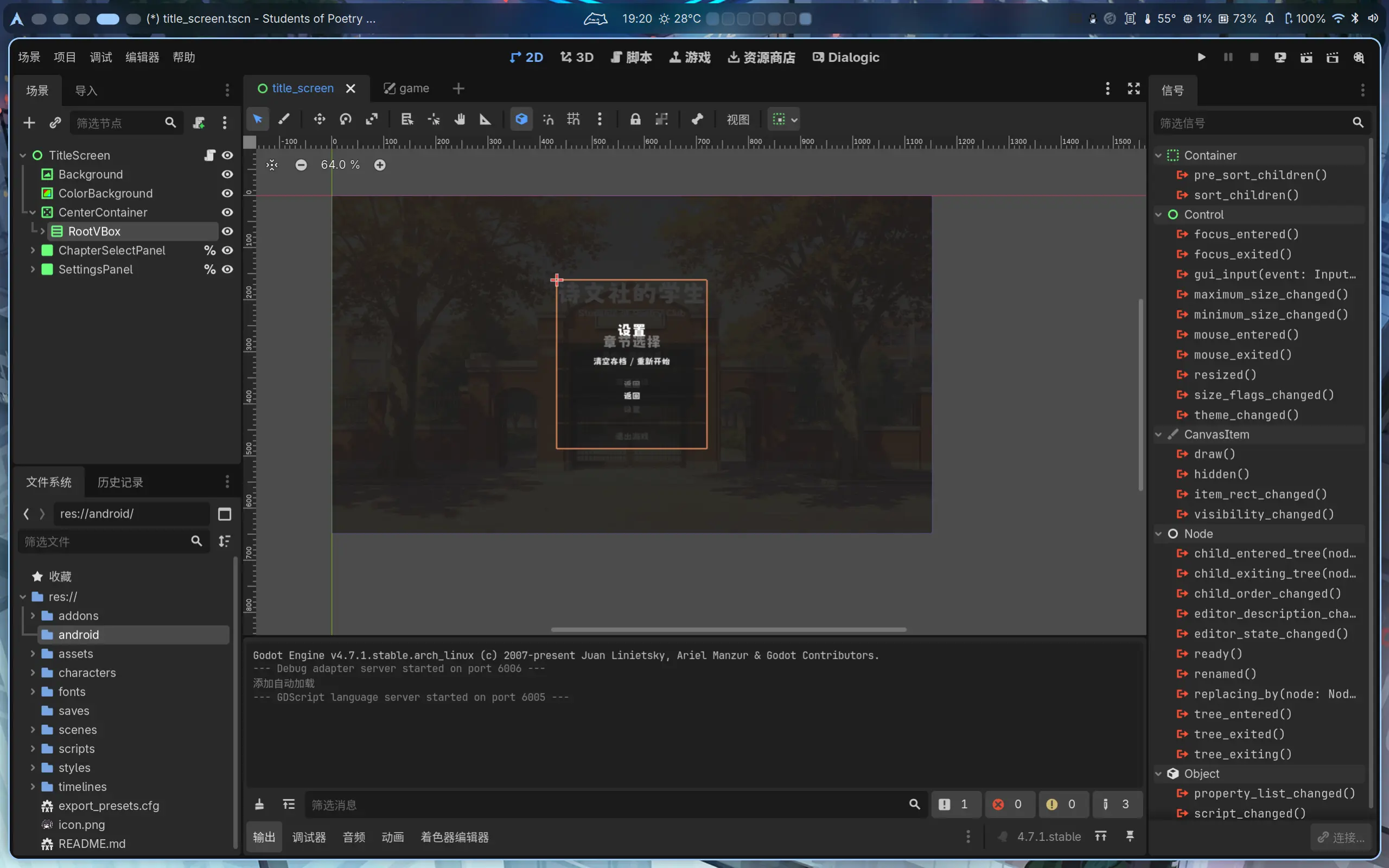
<p>这个项目是束束一直以来想做的。在束束还在上高中的时候，有位好朋友向我提到了“诗词娘” Galgame 的想法，苦于时间有限，承诺要帮忙一起做的东西一直没有交付，后来我们渐渐忘记了这件事，想法也搁置了。</p>
<p>现在步入一个很长的假期，束束希望可以完成我曾经的承诺，并悄悄给同学一个惊喜，然而开发过程并非一帆风顺，遇到了很多困难，目前项目甚至暂时陷入了停滞状态&hellip;&hellip;之后准备再写一些开发手记来详细谈谈遇到的问题</p>
<p>


<figure>
    <img class="my-0 rounded-md" loading="lazy" alt="Godot开发界面" src="https://maxlen727.github.io/picx-images-hosting/1785756026206751010.7lkphc7zn0.webp">

  
</figure>
</p>
<hr>

<h2 class="relative group">开始用 niri 了 
    <div id="开始用-niri-了" class="anchor"></div>
    
    <span
        class="absolute top-0 w-6 transition-opacity opacity-0 ltr:-left-6 rtl:-right-6 not-prose group-hover:opacity-100 select-none">
        <a class="group-hover:text-primary-300 dark:group-hover:text-neutral-700 !no-underline" href="#%e5%bc%80%e5%a7%8b%e7%94%a8-niri-%e4%ba%86" aria-label="锚点">#</a>
    </span>        
    
</h2>
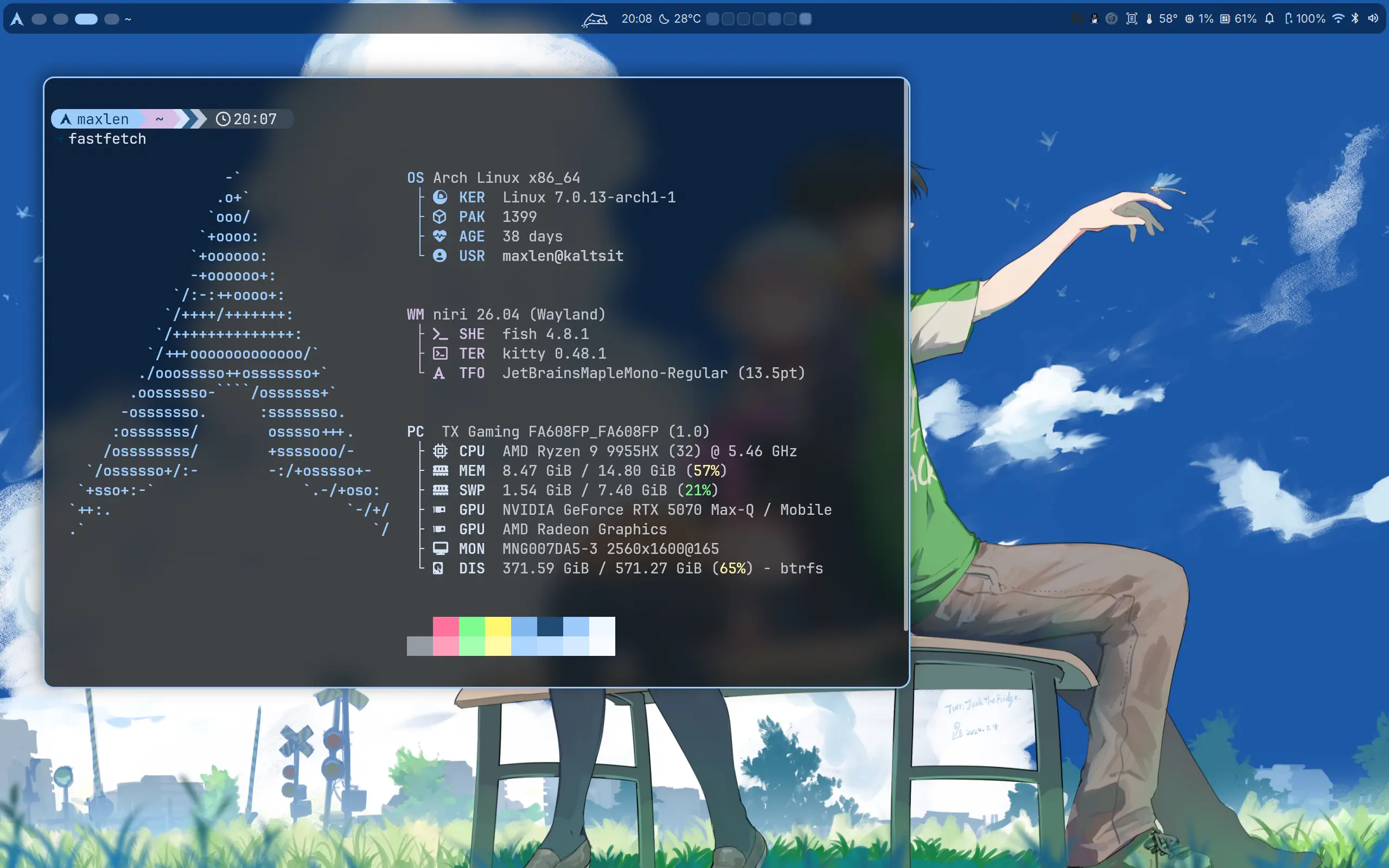
<p>以前也用过窗口管理器 hyprland, 之后在某次更新中束束原来写的 hyprland 配置由于语法被破坏了，这才让束束明白到 hyprland 实在是一个非常激进的项目，它并不适合日用。并且当时的时间似乎是 2023 年末，那会 Wayland 还不像现在一样成熟。最后还是用回了 KDE</p>
<p>最近刷到了 <a
  href="https://www.bilibili.com/video/BV1CHZaBrEF6/"
    target="_blank"
  >shorin 的 niri+DMS 的配置脚本</a>，发现了 DMS. 不得不感叹时代的进步，束束最后使用 hyprland 的那段时间其实已经步入“后自组装时代”&amp;“前 QiuckShell 时代”了，可那会束束没有去深研究。如今发现了 DankMaterialShell 这种东西出来，愈发觉得 wm 越来越逐渐变成一个完善的 de 了。</p>
<p>所以就是这样，我用上了 niri. 早期 niri 的前几个 preview 版本束束就已经在关注这个项目了，也实在没想到它这么快就成长为了和 hyprland 同级别的 wm.</p>
<p>


<figure>
    <img class="my-0 rounded-md" loading="lazy" alt="我现在的桌面" src="https://maxlen727.github.io/picx-images-hosting/image.232l18pyex.webp">

  
</figure>
</p>
<hr>

<h2 class="relative group">解放于高考，囿困于自由 
    <div id="解放于高考囿困于自由" class="anchor"></div>
    
    <span
        class="absolute top-0 w-6 transition-opacity opacity-0 ltr:-left-6 rtl:-right-6 not-prose group-hover:opacity-100 select-none">
        <a class="group-hover:text-primary-300 dark:group-hover:text-neutral-700 !no-underline" href="#%e8%a7%a3%e6%94%be%e4%ba%8e%e9%ab%98%e8%80%83%e5%9b%bf%e5%9b%b0%e4%ba%8e%e8%87%aa%e7%94%b1" aria-label="锚点">#</a>
    </span>        
    
</h2>
<p>束束的前面十几年人生都是被安排好的人生。</p>
<p>生活有父母帮我安排，到学校有课表的安排，老师的安排，回家又有作业的安排。真正自由可控的时间是少的——在这段自由的时间里我会去做一些自己喜欢的事，比如学习编程，折腾电脑。束束也曾幻想过等到自己没有课业所扰，可以畅游任意一个世界时能有多开心。</p>
<p>然而真正解放了，我丢失了什么。</p>
<p>是什么呢？束束不清楚这是什么原因。明明在没有时间的时候非常拥有折腾的热情——束束愿意把不多的假期全都投入到折腾电脑里，游戏也不打，屋门也不迈，时间会忘记，吃饭也不需要。现在呢？大把的时间，却躺在床上发呆，无心做一切。</p>
<p>这种拥有对束束来说太不真实，我竟然无法适应。</p>
<p>漫漫地度过了快两个月，我却没有做到过去畅想中的自己。时间无穷，耐心反而更被消磨：看视频我竟然无意识地倍速播放——这是一个令束束非常警惕的信号，通常束束会认为这是耐心不足——我很浮躁（尽管没有表现出来）</p>
<p>这也是束束写作的原因，写作是我整理生活的方式。只有这时候束束才能跟自己独处，和她说会话。</p>
<p>好累。</p>
<p>我又被自由困住了。</p>
<hr>

<h2 class="relative group">一个奇怪的作息改变 
    <div id="一个奇怪的作息改变" class="anchor"></div>
    
    <span
        class="absolute top-0 w-6 transition-opacity opacity-0 ltr:-left-6 rtl:-right-6 not-prose group-hover:opacity-100 select-none">
        <a class="group-hover:text-primary-300 dark:group-hover:text-neutral-700 !no-underline" href="#%e4%b8%80%e4%b8%aa%e5%a5%87%e6%80%aa%e7%9a%84%e4%bd%9c%e6%81%af%e6%94%b9%e5%8f%98" aria-label="锚点">#</a>
    </span>        
    
</h2>
<p>束束把作息调到了下午6点左右入睡，我会在凌晨3点或4点左右起床。显然这么做我睡的时间更长了，这对束束来说很舒服，并且似乎白天的精力也更充足。</p>
<p>以及最重要的——一个人，安静地，等待黎明。</p>
<hr>

<h2 class="relative group">感叹 AI 之速 
    <div id="感叹-ai-之速" class="anchor"></div>
    
    <span
        class="absolute top-0 w-6 transition-opacity opacity-0 ltr:-left-6 rtl:-right-6 not-prose group-hover:opacity-100 select-none">
        <a class="group-hover:text-primary-300 dark:group-hover:text-neutral-700 !no-underline" href="#%e6%84%9f%e5%8f%b9-ai-%e4%b9%8b%e9%80%9f" aria-label="锚点">#</a>
    </span>        
    
</h2>
<p>AI 进步神速。</p>
<p>以前束束跟进 AI 的模型进展，现在这反而是最不重要的一部分，对于 Agent 的实际使用反而才是现在 AI 时代重要的一部分。</p>
<p>曾经 AI 也就是日常对话，谁能想如今能够 Vibe Coding. 以前束束把 AI 的代码补全都当笑话看，现在又不得不佩服 AI 的代码能力之强大。以前 AI 实时音频对话都做不到，现在能够视频通话的模型遍地开花。以前的 Stable Diffusion 画图也就是能看的水平，如今的 AI 作图 SOTA 模型堪称惊艳。</p>
<p>这一切变化仅仅花了 1 年时间。1 年就可如此，不敢想之后的时代会变化成怎样。</p>
<p>束束自己也从此受益：Claude 帮我写了很多代码，解决了很多疑难。比如这个 DMS 的 Github Heatmap Plus 插件：</p>
<div class="github-card-wrapper">
    <a id="github-599a73ddce4014e0c19d9494eb70d800" target="_blank" href="https://github.com/maxlen727/DMS-GitHub_HeatMap_Plus" class="cursor-pointer">
      <div
        class="w-full md:w-auto p-0 m-0 border border-neutral-200 dark:border-neutral-700 border rounded-md shadow-2xl"><div class="w-full nozoom">
            <img
              src="https://opengraph.githubassets.com/0/maxlen727/DMS-GitHub_HeatMap_Plus"
              alt="GitHub Repository Thumbnail"
              class="nozoom mt-0 mb-0 w-full h-full object-cover">
          </div><div class="w-full md:w-auto pt-3 p-5">
          <div class="flex items-center">
            <span class="text-2xl text-neutral-800 dark:text-neutral mr-[10px]">
              <span class="relative block icon"><svg xmlns="http://www.w3.org/2000/svg" viewBox="0 0 496 512"><path fill="currentColor" d="M165.9 397.4c0 2-2.3 3.6-5.2 3.6-3.3.3-5.6-1.3-5.6-3.6 0-2 2.3-3.6 5.2-3.6 3-.3 5.6 1.3 5.6 3.6zm-31.1-4.5c-.7 2 1.3 4.3 4.3 4.9 2.6 1 5.6 0 6.2-2s-1.3-4.3-4.3-5.2c-2.6-.7-5.5.3-6.2 2.3zm44.2-1.7c-2.9.7-4.9 2.6-4.6 4.9.3 2 2.9 3.3 5.9 2.6 2.9-.7 4.9-2.6 4.6-4.6-.3-1.9-3-3.2-5.9-2.9zM244.8 8C106.1 8 0 113.3 0 252c0 110.9 69.8 205.8 169.5 239.2 12.8 2.3 17.3-5.6 17.3-12.1 0-6.2-.3-40.4-.3-61.4 0 0-70 15-84.7-29.8 0 0-11.4-29.1-27.8-36.6 0 0-22.9-15.7 1.6-15.4 0 0 24.9 2 38.6 25.8 21.9 38.6 58.6 27.5 72.9 20.9 2.3-16 8.8-27.1 16-33.7-55.9-6.2-112.3-14.3-112.3-110.5 0-27.5 7.6-41.3 23.6-58.9-2.6-6.5-11.1-33.3 2.6-67.9 20.9-6.5 69 27 69 27 20-5.6 41.5-8.5 62.8-8.5s42.8 2.9 62.8 8.5c0 0 48.1-33.6 69-27 13.7 34.7 5.2 61.4 2.6 67.9 16 17.7 25.8 31.5 25.8 58.9 0 96.5-58.9 104.2-114.8 110.5 9.2 7.9 17 22.9 17 46.4 0 33.7-.3 75.4-.3 83.6 0 6.5 4.6 14.4 17.3 12.1C428.2 457.8 496 362.9 496 252 496 113.3 383.5 8 244.8 8zM97.2 352.9c-1.3 1-1 3.3.7 5.2 1.6 1.6 3.9 2.3 5.2 1 1.3-1 1-3.3-.7-5.2-1.6-1.6-3.9-2.3-5.2-1zm-10.8-8.1c-.7 1.3.3 2.9 2.3 3.9 1.6 1 3.6.7 4.3-.7.7-1.3-.3-2.9-2.3-3.9-2-.6-3.6-.3-4.3.7zm32.4 35.6c-1.6 1.3-1 4.3 1.3 6.2 2.3 2.3 5.2 2.6 6.5 1 1.3-1.3.7-4.3-1.3-6.2-2.2-2.3-5.2-2.6-6.5-1zm-11.4-14.7c-1.6 1-1.6 3.6 0 5.9 1.6 2.3 4.3 3.3 5.6 2.3 1.6-1.3 1.6-3.9 0-6.2-1.4-2.3-4-3.3-5.6-2z"/></svg>
</span>
            </span>
            <div
              id="github-599a73ddce4014e0c19d9494eb70d800-full_name"
              class="m-0 font-bold text-xl text-neutral-800 decoration-primary-500 hover:underline hover:underline-offset-2 dark:text-neutral">
              maxlen727/DMS-GitHub_HeatMap_Plus
            </div>
          </div>

          <p id="github-599a73ddce4014e0c19d9494eb70d800-description" class="m-0 mt-2 text-md text-neutral-800 dark:text-neutral">
            🧩 GitHub contribution heatmap for DankBar and your desktop, with color-coded activity levels and theme-aware styling.
          </p>

          <div class="m-0 mt-2 flex items-center">
            <span
              class="mr-1 inline-block h-3 w-3 rounded-full"
              style="background-color: #44a51c"></span>
            <div class="m-0 mr-5 text-md text-neutral-800 dark:text-neutral">
              QML
            </div>

            <span class="text-md mr-1 text-neutral-800 dark:text-neutral">
              <span class="relative block icon"><svg xmlns="http://www.w3.org/2000/svg" viewBox="0 0 576 512"><path fill="currentColor" d="M287.9 0C297.1 0 305.5 5.25 309.5 13.52L378.1 154.8L531.4 177.5C540.4 178.8 547.8 185.1 550.7 193.7C553.5 202.4 551.2 211.9 544.8 218.2L433.6 328.4L459.9 483.9C461.4 492.9 457.7 502.1 450.2 507.4C442.8 512.7 432.1 513.4 424.9 509.1L287.9 435.9L150.1 509.1C142.9 513.4 133.1 512.7 125.6 507.4C118.2 502.1 114.5 492.9 115.1 483.9L142.2 328.4L31.11 218.2C24.65 211.9 22.36 202.4 25.2 193.7C28.03 185.1 35.5 178.8 44.49 177.5L197.7 154.8L266.3 13.52C270.4 5.249 278.7 0 287.9 0L287.9 0zM287.9 78.95L235.4 187.2C231.9 194.3 225.1 199.3 217.3 200.5L98.98 217.9L184.9 303C190.4 308.5 192.9 316.4 191.6 324.1L171.4 443.7L276.6 387.5C283.7 383.7 292.2 383.7 299.2 387.5L404.4 443.7L384.2 324.1C382.9 316.4 385.5 308.5 391 303L476.9 217.9L358.6 200.5C350.7 199.3 343.9 194.3 340.5 187.2L287.9 78.95z"/></svg></span>
            </span>
            <div id="github-599a73ddce4014e0c19d9494eb70d800-stargazers" class="m-0 mr-5 text-md text-neutral-800 dark:text-neutral">
              4
            </div>

            <span class="text-md mr-1 text-neutral-800 dark:text-neutral">
              <span class="relative block icon"><svg xmlns="http://www.w3.org/2000/svg" viewBox="0 0 448 512"><path fill="currentColor" d="M80 104c13.3 0 24-10.7 24-24s-10.7-24-24-24S56 66.7 56 80s10.7 24 24 24zm80-24c0 32.8-19.7 61-48 73.3V192c0 17.7 14.3 32 32 32H304c17.7 0 32-14.3 32-32V153.3C307.7 141 288 112.8 288 80c0-44.2 35.8-80 80-80s80 35.8 80 80c0 32.8-19.7 61-48 73.3V192c0 53-43 96-96 96H256v70.7c28.3 12.3 48 40.5 48 73.3c0 44.2-35.8 80-80 80s-80-35.8-80-80c0-32.8 19.7-61 48-73.3V288H144c-53 0-96-43-96-96V153.3C19.7 141 0 112.8 0 80C0 35.8 35.8 0 80 0s80 35.8 80 80zm208 24c13.3 0 24-10.7 24-24s-10.7-24-24-24s-24 10.7-24 24s10.7 24 24 24zM248 432c0-13.3-10.7-24-24-24s-24 10.7-24 24s10.7 24 24 24s24-10.7 24-24z"/></svg></span>
            </span>
            <div id="github-599a73ddce4014e0c19d9494eb70d800-forks" class="m-0 mr-5 text-md text-neutral-800 dark:text-neutral">
              0
            </div>
          </div>
        </div>
      </div>


    </a>
  </div>
<p>基本上都是 Claude 写的，效果非常好。</p>
<p>另外上文提到的游戏，Claude 也参与了极多，还有一些绘图模型参与。没有 AI 我真的无法一人进行这游戏的开发。</p>
<p>切切实实，我感受到了 AI 之速。太快了，她极快地进步，极快地改变时代。</p>
]]></content><category term="并非Weekly"/><category term="睡觉"/><category term="AI"/><category term="Galgame"/><category term="Linux"/><category term="Wayland"/><category term="Niri"/><category term="DMS"/><category term="高考"/></entry><entry><id>https://maxlen727.github.io/posts/pipewire-obs-virtual-mic/</id><title>用 PipeWire 和 OBS 实现 Linux 下虚拟麦克风</title><published>2025-03-22T06:30:43+08:00</published><updated>2025-03-22T06:30:43+08:00</updated><author><name>微恙</name></author><link href="https://maxlen727.github.io/posts/pipewire-obs-virtual-mic/" rel="alternate" type="text/html"/><summary>在视频录制或直播时，OBS 不仅能作为虚拟摄像头，还能通过一些设置将音频输出转换成虚拟麦克风，以此来享受 OBS 的降噪、增益、调音或别的插件效果</summary><content type="html" xml:base="https://maxlen727.github.io/posts/pipewire-obs-virtual-mic/"><![CDATA[<p>在视频录制或直播时，OBS 不仅能作为虚拟摄像头，还能通过一些设置将音频输出转换成虚拟麦克风，以此来享受 OBS 的降噪、增益、调音或别的插件效果。</p>
<hr>

<h2 class="relative group">1. 创建虚拟音频设备 
    <div id="1-创建虚拟音频设备" class="anchor"></div>
    
    <span
        class="absolute top-0 w-6 transition-opacity opacity-0 ltr:-left-6 rtl:-right-6 not-prose group-hover:opacity-100 select-none">
        <a class="group-hover:text-primary-300 dark:group-hover:text-neutral-700 !no-underline" href="#1-%e5%88%9b%e5%bb%ba%e8%99%9a%e6%8b%9f%e9%9f%b3%e9%a2%91%e8%ae%be%e5%a4%87" aria-label="锚点">#</a>
    </span>        
    
</h2>
<p>KDE 6下可以利用 PipeWire 来创建虚拟设备。首先，需要建立两个虚拟设备：</p>
<ul>
<li><strong>Virtual-Sink</strong>：作为 OBS 的虚拟音频输出设备。</li>
<li><strong>Virtual-Mic</strong>：作为虚拟麦克风输入设备，将 Virtual-Sink 的监控音频传输到其他应用程序。</li>
</ul>
<p>打开终端，输入以下命令：</p>
<div class="highlight"><pre tabindex="0" class="chroma"><code class="language-bash" data-lang="bash"><span class="line"><span class="cl">pactl load-module module-null-sink media.class<span class="o">=</span>Audio/Sink <span class="nv">sink_name</span><span class="o">=</span>Virtual-Sink
</span></span><span class="line"><span class="cl">pactl load-module module-null-sink media.class<span class="o">=</span>Audio/Source/Virtual <span class="nv">sink_name</span><span class="o">=</span>Virtual-Mic
</span></span></code></pre></div><p>这两条命令会分别创建名为 <code>Virtual-Sink</code> 和 <code>Virtual-Mic</code> 的虚拟音频设备。(&gt;ω&lt;)</p>
<hr>

<h2 class="relative group">2. 连接音频通道 
    <div id="2-连接音频通道" class="anchor"></div>
    
    <span
        class="absolute top-0 w-6 transition-opacity opacity-0 ltr:-left-6 rtl:-right-6 not-prose group-hover:opacity-100 select-none">
        <a class="group-hover:text-primary-300 dark:group-hover:text-neutral-700 !no-underline" href="#2-%e8%bf%9e%e6%8e%a5%e9%9f%b3%e9%a2%91%e9%80%9a%e9%81%93" aria-label="锚点">#</a>
    </span>        
    
</h2>
<p>下一步是将 OBS 的音频输出连接到 Virtual-Sink，再将 Virtual-Sink 的监控输出链接到 Virtual-Mic。具体操作如下：</p>
<ol>
<li>使用 <code>pw-link</code> 命令列出所有音频输出设备，找到 OBS 的音频输出设备（通常名称中会包含 <code>obs</code>）：</li>
</ol>
<div class="highlight"><pre tabindex="0" class="chroma"><code class="language-bash" data-lang="bash"><span class="line"><span class="cl">pw-link -o
</span></span></code></pre></div><ol start="2">
<li>将 OBS 的左右声道分别连接到 Virtual-Sink：</li>
</ol>
<div class="highlight"><pre tabindex="0" class="chroma"><code class="language-bash" data-lang="bash"><span class="line"><span class="cl">pw-link OBS-Monitor:output_FL Virtual-Sink:playback_FL
</span></span><span class="line"><span class="cl">pw-link OBS-Monitor:output_FR Virtual-Sink:playback_FR
</span></span></code></pre></div><ol start="3">
<li>再将 Virtual-Sink 的监控输出连接到 Virtual-Mic 的左右声道：</li>
</ol>
<div class="highlight"><pre tabindex="0" class="chroma"><code class="language-bash" data-lang="bash"><span class="line"><span class="cl">pw-link Virtual-Sink:monitor_FL Virtual-Mic:input_FL
</span></span><span class="line"><span class="cl">pw-link Virtual-Sink:monitor_FR Virtual-Mic:input_FR
</span></span></code></pre></div><p>这样一来，OBS 输出的音频就会经过 Virtual-Sink，再由 Virtual-Mic 将音频传递给其他应用程序。(๑•̀ㅂ•́)و✧</p>
<hr>

<h2 class="relative group">3. OBS 内部设置 
    <div id="3-obs-内部设置" class="anchor"></div>
    
    <span
        class="absolute top-0 w-6 transition-opacity opacity-0 ltr:-left-6 rtl:-right-6 not-prose group-hover:opacity-100 select-none">
        <a class="group-hover:text-primary-300 dark:group-hover:text-neutral-700 !no-underline" href="#3-obs-%e5%86%85%e9%83%a8%e8%ae%be%e7%bd%ae" aria-label="锚点">#</a>
    </span>        
    
</h2>
<p>为了让 OBS 的音频正确传输，咱们还需要在 OBS 内部进行相应设置：</p>
<ul>
<li><strong>设置音频输出设备</strong>：
在 OBS 菜单中，依次点击“文件” &gt; “设置” &gt; “音频”，将“高级”中的“监听设备”设置为刚刚创建的 <code>Virtual-Sink</code>。</li>
<li><strong>启用音频监听</strong>：
在 OBS 主界面，点击音频混音器中齿轮图标。将需要传输的音频源的“音频监听”设置为“监听和输出”，这样 OBS 会同时输出和监听该音频。</li>
</ul>
<hr>
<p>以上就是 Linux 下通过 PipeWire 配置 OBS 虚拟麦克风的全部步骤，希望能帮助各位轻松实现音频传输，享受更好的直播或录制体验！(≧◡≦)喵～</p>
<blockquote>
<p>本文使用了 AI 协助写作</p></blockquote>
]]></content><category term="Linux"/><category term="Wayland"/><category term="OBS"/><category term="小记"/></entry></feed>